Sunday, June 29, 2008

A very thoughtful reader post

Reader "Ernie" wrote a very thoughtful post to my last entry ( see http://tinyurl.com/54d7u )

Thank you for your excellent post, Ernie.

Yes, the requirements for life to get started are rigorous. Astronomer Frank Drake produced a famous equation (the eponymous "Drake Equation") that tries to make reasonable, educated guesses about how common life is. His equation looks scary, but actually is just assigning best-guess numbers to things like how many stars there are, what percentage of stars have planets, what percentage of planets have conditions favorable for life, how many actually produce life, how many produce intelligent life, etc.

The early math guesstimated that there's a fair amount of life in the broadest sense (including simple microbes), a much smaller subset of intelligent life, and at best maybe 10 advanced, technological civilizations sharing our galaxy. Of course, the galaxy is so large that finding them will be very hard; something like finding 10 particular grains of sand scattered somewhere among all the beaches in all the world.

Some estimates place the numbers higher, others (including the above Wikipedia article) lower.

In any case, all the estimates were based on a belief that only about half of all stars will have planets to start with.

But now, we're finding that planets are actually common. Planets may even be the Universe's default state for star systems.

I can remember science texts and articles (not all that long ago) showing star formation as a neat symmetric infall to a cloudy, glowing core; a little rotation creating a lovely whirlpool effect.

But nature isn't that tidy. Star systems aren't born in a neat symmetric infall, but rather in the slow-motion teeming chaos of a condensing nebula, compressed by shockwaves from distant novas and on its way to gravitational collapse. You've seen pictures of that kind of nebula; Hubble has captured many, like this:


It's beautiful, but there's nothing neat about it. It's all swirls and eddies, columns and clouds, dense knots and tenuous veils. In short: A gorgeous, seething mess.

Messy enough, in fact, so that after the stars form, there'll almost always be stuff left over: Planets. And that's what changes one of the Drake Equation's foundation assumptions.

It means that the pool of potential life-supporting planets is much, much larger than anyone previously thought.

That doesn't make Earth any less special, at least not to those of us who live here. It takes nothing away from us or our situation, which remains as before.

But just as travel abroad lets you see your own culture and life in a new way, finding other life forms (advanced or not) in the universe would tell us a lot about ourselves.

TS Eliot said "We shall not cease from exploration and the end of all our exploring will be to arrive where we started and know the place for the first time."

With the search for extraterrestrial life, it's not just a place we're coming to know, but our very selves.

Friday, June 27, 2008

It's changing the way I look at the night sky.

There was incredible news from Mars yesterday. No, not the water ice. That was last week, and actually was widely expected. It's great to have the theories confirmed, but they were thought to be pretty solid anyway; and they were.

I'm talking about the soil analysis they're doing, cooking little bits of Mars in tiny laboratory ovens and having sensors sniff what wafts out.( http://phoenix.lpl.arizona.edu/ )

“We basically have found what appears to be the requirements, the nutrients, to support life whether past, present or future,” said Samuel P. Kounaves of Tufts University, who is leading the chemical analysis… “The sort of soil you have there is the type of soil you’d probably have in your backyard.”

In short: the building blocks of Mars turn out to be pretty much the same as Earth's. If Martian soil had been toxic or wildly different from Earth's, it would have toppled several theories, and made our position in the Universe all the lonelier: Anything that points to Earth being unique and different makes it that less likely that other Earths would exist.

But when we find that Earth isn't so unique, it makes it all the more likely that there'd be life elsewhere too.

Now consider this: We've barely started hunting but so far we've already discovered, 259 other stars that have planets circling them; and we've found 303 alien planets in all around those other stars. (http://planetquest.jpl.nasa.gov/ ) New planets and planetary systems are announced every few days, it seems, and detection has gotten so good that scientists are starting to be able to see planets down into the size range of Earth. (http://www.dailymail.co.uk/sciencetech/article-450467/Found-20-light-years-away-New-Earth.html ) Planets are turning out to be absolutely commonplace.

Our non-unique solar system with its non-unique chemistry produced life least once (here on Earth); maybe twice, depending on the details of Mars' past; and maybe even a third and fourth time if theories about some of the large moons of the gas giant planets prove correct.

So imagine how filled with life the universe is likely to be.

That's what's changing the way I look at the night sky.

Next time you look at the stars, realize that you're looking at a universe that filled not only with uncountable stars, but an even larger number of planets--- far more planets than anyone imagined even a few short years ago. It's odds-on that there are many, many other "Earths" out there.

So as you look up, there's a real chance that somewhere out there, alien eyes are looking back at you, searching the distant sky, and wondering if you exist.

More?

Martian soil appears able to support life
http://www.reuters.com/article/wtMostRead/idUSN2634952620080626

Mars Soil 'Friendly' To Life, Tests Show
http://www.washingtonpost.com/wp-dyn/content/article/2008/06/26/AR2008062603578.html?hpid=moreheadlines

Tests show Martian soil can support life
http://www.computerworld.com/action/article.do?command=viewArticleBasic&taxonomyId=11&articleId=9104018&intsrc=hm_topic

Mars lab finds nutrient minerals plants use
http://www.sfgate.com/cgi-bin/article.cgi?f=/c/a/2008/06/27/MN3P11FNT9.DTL

Mars soil capable of sustaining plant life
http://www.latimes.com/news/nationworld/nation/la-sci-phoenix27-2008jun27,0,147368.story

Alkaline Soil Sample From Mars Reveals Presence of Nutrients for Plants to Grow http://www.nytimes.com/2008/06/27/science/space/27MARS.html?_r=1&ref=us&oref=slogin

Wet chemistry on the Martian surface
http://arstechnica.com/journals/science.ars/2008/06/26/wet-chemistry-on-the-martian-surface

Thursday, June 26, 2008

Right brain, left brain....

Dunno if you saw this: http://tinyurl.com/5eobxu It's a NYTimes article, and may require a free login.

It's an article on medical research looking at the specific portions of the brain involved in wit, puns, general humor, and specifically sarcasm. Turns out the same part of the brain that helps interpret visual context is also used to discern social context--- such as a tone or body language that conveys that the words being spoken are meant only sarcastically and not literally.

People with damage in that area can't tell the different between someone agreeing for real, saying "sure" and someone not really agreeing with them at all and saying "suuuuuuure."

I've always thought of myself as a left-brain kind of guy, so I welcome anything that suggests that my right brain isn't entirely atrophied. 8-)

(Or did I mean that only sarcastically?)

There'll always be an England


This specially-equipped police canal barge is capable of top speeds approaching 4--- yes, four--- miles per hour (6 kph).

Their first pursuit and capture of a suspected stolen barge took 8 full days. Really!

Full story HERE.

Wednesday, June 25, 2008

another medium-large file sharing option

I've been exploring the free "Windows Live" services ( http://home.live.com/ ), just to see what's available. One of the offerings is "Skydrive," online file storage with 5GB of space free.

For example, here's a full-resolution cloud photo from my tornado trip:
http://tinyurl.com/495b8f

Your browser will likely shrink the photo to show you it as a whole, but if you click on the displayed image, you should be able to view it in its original (large!) size.

You also can password-protect Skydrive files you don't want made public.

Anyway, just one more option to toss into the mix!

Tuesday, June 24, 2008

large-file sharing sites

I recently had to shuffle some gigabyte-sized files around, and so needed to take a fresh look at ways to share very large files over the internet. Sad to day, many email systems limit file attachments to 20MB or so. That used to be enough for a book. Now it's maybe enough for a few vacation snapshots.

Of course, you can break a large file into bite-sized pieces with ZIP-type archivers, email the chunks, and let the recipient reassemble them pieces back into their original whole. It works, but is a pain.

If you have your own domain and the hosting service has generous disk space allowances, you can transfer large files that way. I sold my domains along with my newsletter business, and so didn't have that option. (I do have LangaOnline.com registered, but it's just a placeholder site with no real server access.)

There are commercial remote-access and remote-control services such as LogMeIn or GoToMyPC. They can work great, but are overkill for simple file transfer....

But perhaps the easiest way is to use any of the large-file-sharing services. There are literally dozens and dozens, and the list changes almost every day. But what you normally get for free is a way to upload a large file to a central server; which then generates a download URL you that can email to your intended recipients. They click the URL to download the file from the server to their PC. The server then deletes its copy of the file.

Most free services entice you to become a paying customer by "throttling" the upload or download speeds so transferring a large file takes quite a while. If you're in a hurry, you can bypass the artificial speed limits by paying the (usually) modest signup fee. But if speed isn't your top priority, the slower up/download speed can work just fine. Just let it cook as a background task while you use your PC for other things.

Some of these large-file services require that you install a small up/download manager. Others require no extra software.

Here's a list of many of the current crop of large-file services. There'll be some duds in here--- the services come and go all the time--- but if you need a cheap way to send very large files, this should at least provide a couple of options:

MyShareFile -->> Max File Size 150MB -->> http://www.mysharefile.com/

iHud -->> Max File Size 50MB -->> http://ihud.com/

BigFilez -->> Max File Size 50MB -->> http://www.bigfilez.com/

UploadSpy -->> Max File Size 75MB -->> http://www.uploadspy.com/

Streamload -->> Max 25,000 MBs Per Account -->> http://www.streamload.com/

BestSharing -->> Max File Size 150MB -->> http://www.bestsharing.com/

Content-Type -->> Max File Size 100MB -->> http://www.content-type.com/

FileGig -->> Max File Size 1000MB -->> http://www.filegig.com/upload.php

FileWire -->> Max File Size 250MB -->> http://www.filewire.com/

MyCHost -->> Max File Size 250MB -->> http://filehost.mychost.com/

UploadFarm -->> Max File Size 100MB -->> http://www.uploadfarm.com/

Badongo -->> Max File Size 1000MB -->> http://www.badongo.com/

AxiFile -->> Max File Size 150MB -->> http://www.axifile.com/

EasyFileHost -->> Max File Size 1000MB -->> http://www.easyfilehost.com/

FileHost.RO -->> Max File Size 100MB -->> http://www.filehost.ro/

FilesXfer -->> Max File Size Unlimited -->> http://www.filesxfer.com/

FTP.nu -->> Max File Size 100MB -->> http://www.ftp.nu/

OxyShare -->> Max File Size 700MB -->> http://www.oxyshare.com/

Up-File -->> Max File Size 1000MB -->> http://up-file.com/

11Send -->> Max File Size 100MB -->> http://www.11send.com/

Sharelor -->> Max File Size 200MB -->> http://www.sharelor.com/

UShareIt -->> Max File Size 50MB -->> http://www.ushareit.com/

UploadSend -->> Max File Size 50MB -->> http://www.uploadsend.com/

TurboUpload -->> Max File Size 70MB -->> http://www.turboupload.com/

11Mbit.in -->> Max File Size 40MB (Constantly Raised) -->> http://s4.11mbit.in/

WebFileHost -->> Max File Size 500MB -->> http://www.webfilehost.com/index.php

FTPz.US -->> Max File Size 1001MB -->> http://ftpz.us/

Monday, June 23, 2008

Note to self

When trying to type http://live.msn.com/, be sure you never, ever type http://live.man.com/ by mistake.

Sunday, June 22, 2008

make-your-own-panorama software

Fred: I read your complete ride report of your trek across North America and really enjoyed it, and all of the photos. I especially liked a couple of the photostitched images you put together, and was wondering if you'd share the name of the software that you used to piece them together. I've seen lots and lots out there, but valued your opinion on ease of use, etc. and figured if there's a bit of software out there that you'd spend time using, it's probably worth investigating. -- Chad

This is the kind of image he's talking about:
Click for Black Canyon panorama

(let it load all the way; and you may have to use your browser's zoom function to view it in full resolution)

There are quite a few panorama tools, as a Google search will reveal: http://tinyurl.com/63r8p7

The one I used is Autostitch:
http://www.cs.ubc.ca/~mbrown/autostitch/autostitch.html


It's almost AI-ware: you can feed in images in any order and it will automagically find the matching parts of adjacent images, assemble the collage as a continuous visual whole, blend the seams together, do the math to correct for varying perspectives, and then generate a single image. It's very cool, and free; it's a demo of the technology built into other commercial panorama tools

It runs a few times, and then disables itself, but I discovered quite by accident that if you run it from inside a zip archive, the demo never times out... 8-)

Saturday, June 21, 2008

reader question

Vince Winterling has left a new comment on your post "Upgrading XP": Surprised you haven't upgraded to Vista. Any particular reason?

Yup. Tried it. Didn't like it. :-)

I have a very nice 3.2GHz desktop system a couple years old (my main pc), but my sound system doesn't have Vista drivers. Runs fine on XP, but Vista is a no-go. It's now running XP, and is a fine system, overall.

My laptop is a 1.6GHz unit, and it bogged down something awful in Vista. It was like driving a car with the parking brake on. I took Vista off, reinstalled XP and then switched to Firefox which is much leaner and faster than IE. It's like a whole new laptop.

I actually can't go into detail because my noncompete agreement with Brian Livingston (the guy who bought my newsletter business) has another 90 days or so to run: Until the noncompete agreement expires, I can't write my normal sort of how-to columns about Windows.

I'll be happy to provide more detail in a few months, but for now, please understand why my answers are, um, generic. I don't want to violate my agreement, or do anything to damage Brian's business.

Legally yours,

Fred

Friday, June 20, 2008

Russian, er, art

In my tornado-chase story, you may remember some time wasted at Mt Rushmore; which, depending on your point of view, is either a grandly patriotic sculpture or wholesale commercial vandalism.

But after reading this (below), I realize that for all its flaws, Rushmore could have been worse. Much worse.

=======

Article Date: Friday, June 20, 2008
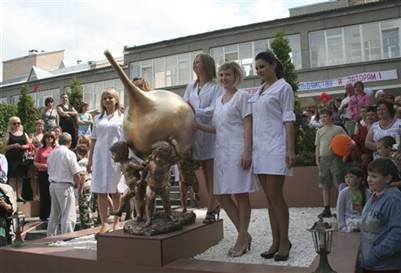
MOSCOW (AP) — A monument to the enema, a procedure many people would rather not think about, has been unveiled at a spa in the southern Russian city of Zheleznovodsk.

The bronze syringe bulb, which weighs 800 pounds (363 kilograms) and is held by three angels, was unveiled at the Mashuk-Akva Term spa, the spa's director said Thursday.

"There is no kitsch or obscenity, it is a successful work of art," Alexander Kharchenko told The Associated Press. "An enema is almost a symbol of our region."

The Caucasus Mountains region is known for dozens of spas where enemas with water from mineral springs are routinely administered to treat digestive and other complaints.

Kharchenko, 50, said the monument cost $42,000 and was installed in a square in front of his spa on Wednesday. A banner declaring: "Let's beat constipation and sloppiness with enemas" — an allusion to a line from "The Twelve Chairs," a famous Soviet film comedy — was posted on one of the spa's walls.

Sculptor Svetlana Avakina said she designed the 5-foot (1.52-meter)-high monument with "irony and humor" and modeled the angels on those in works by Italian Renaissance painter Alessandro Botticelli.

"This device is eternal, it will never change," she told the AP. "We could promote this brand, turn it into a franchise with souvenirs and awards for medical doctors."

Dozens of monuments dedicated to characters from tall tales and popular jokes have been erected in post-Soviet Russia.


Thursday, June 19, 2008

Upgrading XP


No, the above has nothing to do with upgrading XP; it's just an amusing clip.

======

I updated my XP setup CD yesterday, rebuilding it so it includes Service Pack 3--- the latest roll-up of all do-date patches, add-ons, and improvements. The process is called "slipstreaming." Once it's done, when you use your setup CD to install XP, you automatically get all the SP3 updates installed from the start, rather than having to to to the Update site and download all the updates and fixes that have been released since your OS first came out.

If you're the one who manages the local crop of PCs, taking a little time to build a new setup CD that's complete with all to-date patches can save many hours in any future installs you do.

Full how-to here: http://www.winsupersite.com/showcase/xpsp3_slipstream.asp

Wednesday, June 18, 2008

Do-It-Yourself, virtual tornado chases

I've been checking out some of the software tools used by the commercial storm chase company I rode with last month.

Their main weather tool is GRLevel3, software that massages government-supplied radar images to produce wonderfully detailed images.

The NOAA's raw radar feeds are actually quite blocky, like this:


GRLevel3 uses your graphics card or chip to interpolate and smooth the image to something like this:


Your local TV station and your favorite weather sites probably use the same kind of smoothing. Of course, all forms of interpolation and smoothing are mathematical guesses as to what things would look like if we had more complete data. In this case, the guesses are of the educated sort, and can be quite reasonably accurate. But it's good to remember that they are, in fact, guesses. All we really have is the blocky data.

GRLevel3 isn't terribly expensive (free for three weeks, then $80 to keep), and its large-screen format is gorgeous. But because it's using the same raw data and kind of smoothing that's available to anyone, I wondered about freeware alternatives that might be just as good, at least for armchair storm chasing.

Here what I came up with.

I've been a member of the Wunderground.com weather geek site for a long time. The site is free (ad supported), or you can get no ads and enhanced features for 5 bucks for a full year; an incredible bargain.

Use http://www.spc.noaa.gov/products/outlook/, Wunderground or your favorite Wx site to find severe weather areas. (When I say "Wunderground," substitute your personal favorite site, if you prefer.) Using any sources you wish pick out a specific storm or cell to "chase."

Get two browsers open side by side, so you can view both at the same time. With Wunderground open in one browser, open Acme Mapper in the other. Use Mapper's roadmap features to find the same storm area and scale as shown in your Wunderground radar image.

When the maps roughly match, use Mapper's Nexrad overlay. (It won't auto-update; when you see Wunderground's radar update, hit Refresh on the Acme browser to grab the updated radar.) It's the raw feed, and so is blockier than Wunderground's interpolated/smoothed image, but it still will show you coarse storm features.

Use Wunderground's Stormtrack and Animation options to get a feel for where things are going; try to predict where your specific storm is headed. Pick an intercept/observation point where you think you should be to best view the storm (eg outside the core of the storm, to the SE).

Use the roadmap features of Acme to figure out which roads to take to get to your intercept point safely (eg not through the core) and quickly. Zoom in to view the back roads. Mapper's topo map overlays can give you a sense of the countryside, so you won't plot a course into, say, a valley or other area where your viewing options and escape routes are limited.

For realism, keep track of time and distances you plot so you can allow for realistic driving speeds/times from one location to another. With a large enough screen, you could also use a GPS or other driving-direction software to assist in plotting fastest-time or most-direct routes from location to location. That kind of software will also make your driving time estimates more accurate.

Follow your storm for a while, and see how you do!

More:
http://www.stormtrack.org/library/faq/
http://www.cimms.ou.edu/~doswell/Chasing2.html
http://www.cimms.ou.edu/~stumpf/cethics.html

Tuesday, June 17, 2008

The Web, 50 years before it was invented

Paul Otlet was a computing visionary before there were computers.

"In 1934, Otlet sketched out plans for a global network of computers (or 'electric telescopes,' as he called them) that would allow people to search and browse through millions of interlinked documents, images, audio and video files. He described how people would use the devices to send messages to one another, share files and even congregate in online social networks. He called the whole thing a 'réseau,' which might be translated as 'network' — or arguably, 'web.'"

In the 1920's, he (and others, later with the help of the Belgian government) had set out to catalog every piece of information in the world, a "master bibliography of all the world’s published knowledge."

This initial version of the project generated millions of index cards, and was actually used--- sort of a proto-Google. Queries would come in by mail and telegraph, get looked up by a staff of humans, and then the answers would be sent out right away.

The paperwork became unmanageable as the catalog grew, so Otlet turned to mechanized help. "At one point he posited a kind of paper-based computer, rigged with wheels and spokes that would move documents around on the surface of a desk."

"Since there was no such thing as electronic data storage in the 1920s, Otlet had to invent it. He started writing at length about the possibility of electronic media storage, culminating in a 1934 book, 'Monde,' where he laid out his vision of a 'mechanical, collective brain' that would house all the world’s information, made readily accessible over a global telecommunications network."

His work was stopped cold by WWII, and Otlet and his vision were forgotten for decades.

There's a nice story with lots more detail here: http://tinyurl.com/5kal5f (free registration required)

In some ways Otlet's work reminds me of the Phaistos Disk, an early example of movable type that predated Gutenberg by nearly 2000 years. The world wasn't ready, culturally or technologically, for that premature appearance of movable type.

Similarly, the world wasn't quite ready for Otlet; it took another generation for the pieces to be in place. Today's web--- the thing you're using to read these words---is the reinvention of the same basic idea that Otlet had.

Paul Otlet deserves to be remembered.

Sunday, June 15, 2008

Happy Father's Day

Being a Dad is one of the bright spots in my life. We have two kids--- both young adults now--- and seeing their very different personalities evolve and emerge has been a wonderful thing. They're both good people. It's normal for parents to love their children, and I do. But beyond that, I'm also glad to know them as human beings. That's nice to be able to say.

And now, to help contribute to a celebratory mood for the day, some recut movie trailers for your amusement:

http://www.youtube.com/watch?v=KmkVWuP_sO0

http://www.youtube.com/watch?v=2T5_0AGdFic

http://www.youtube.com/watch?v=u1kqqMXWEFs

Saturday, June 14, 2008

amazing new automotive technology

BMW reinvents the zeppelin--- really!

http://www.youtube.com/watch?v=kTYiEkQYhWY

There were some fabric-covered cars in the early days of the automobile, but nothing like what BMW is up to now.

Of course, the first real models with this tech will cost you a body part. But eventually, the tech should filter down to more normally-priced vehicles.

Friday, June 13, 2008

Small aside re: satellite tv dishes


I've been having a ton of trouble with my dish. The original installation was incredibly sloppy and amateurish (eg the main means of dish support was a bare mast--- no tripod or other hardware--- held to a deck railing with plastic zip ties). I had to have a different installer come back to make it at least acceptable. I did further work on the mount (think: angle irons and large hose clamps) to make it sturdier.

The dish lost alignment a couple weeks ago, after about a year in service. I wasn't terribly surprised, given the jerry-rigged nature of the mount. But I was loathe to call back the Direct TV techs as they'd done so poor a job initially. Besides, it's $80 a pop for service calls. So, I bought a special $100 signal strength meter (same basic type as techs use) that lets you do your own precision alignment. I figured I'd lose a little money on the first use, but would be ahead of the game thereafter. And given the low-quality of the mount, I was certain I'd need to use it again.

I read the instruction and found online how-tos, and went to work. I fine-tuned that sucker as best I could and got almost perfect signals on most satellites. Signal strength is shown as relative on the meter; a 0-100 scale. Because of error-correcting bits in the data stream, you can get an OK picture at strengths of 70 or so and above. Anything above 80 or 85 is considered acceptable by Direct TV.

When I finished aiming the dish, I had mostly high 90s and 100s on all but one satellite, which showed straight zeros. Alas, it wasn't the Disney, Orthodontia and Bowel Health channels I was missing; it was most of the mainstream HDTV lineup. Not OK.

The satellites are grouped close together. Usually, when you max out one, the others will be at least close. You tweak the dish, giving up a little signal on the strongest ones to increase the strength of the weakest, until you have acceptable signal strength across the board.

But it made no sense to have 100s on one satellite and zeros on the one right next door.

I tried and tried and tried. Couldn't get it.

I finally called Uncle and asked DTV to send a tech.

It turned out my receiver was dead on the zeroed channel; it was an electrical problem. My dish aiming had been spot on. Grrr.

But while he was here, I asked him to replace the original crap dish installation. He didn't have all the parts he needed, so he improvised.

The new dish setup blew over that night.

I called DTV back, and he came back out with different parts.

The dish blew out of alignment that night, in mild winds.

As an aside, I'd been looking forward to watching the NBA playoffs. I missed the game last night, "the greatest comeback in the Celtics' storied history." Well, I didn't entirely miss it: I have a thousand-year-old 5" black and white portable TV I normally use while running on my treadmill. I was able to watch part of the game on that, while my 50" plasma HDTV sat inert. Sigh. Technologically, it was 1952 again. I felt like I was watching bison paintings on a cave wall.

I'll be back out on the deck today. I'm gonna scrap the DTV dish setup and do it myself, from scratch.

DTV is great in theory, and I have no doubt it *can* work well, but with the end-user's physical setup playing so key a role, and many of the installers operating at what we might charitably call a marginal level of competence, there are variables in the mix that simply don't affect cable or FIOS TV.

Yes, you can get dish TV bundles that cost less than cable. But the lower cost is for a reason, part of which is a higher likelihood of hardware issues than with hardwired connections. You can end up paying for DTV, but end up watching much-anticipated broadcasts on a tiny black and white TV, or worse, while your main TV is down for the count.

I have a minimum commitment on my DTV contract, so I'll stick with the dish for at least a while. (No real choice.) Maybe if I can get the mount OK I won't have further issues. Maybe.

Not a good week for hardware around here, is it? :-)

Thursday, June 12, 2008

I got a note from Morten, in Denmark: "I also take a lot of pride in keeping my systems in good shape. In these days our family rely a lot on our PC's, reading mail, searching the web, home banking and so on. But in the field of backup, I'm not sure if I'm covered good enough.Is it possible, that You could use this opportunity to describe Your backup-setup?"

There are three main components. First, my system automatically backs up my entire "My Documents" folder (including all subfolders) every night. The archive files are zip-compressed, and stored off the main partition. This first-level backup gives me, in effect, one complete data restore point every 24 hours. Even if the OS completely dies; and even if the entire main partition gets trashed, I have all the data safe on another partition.

Second, every now and then (it used to be every day), I'll burn these files to a CD or DVD and store the disk away from the PC. When I've burned enough disks, I'll store them offsite in a rented storage locker. That way, even if my PC were lost to fire, flood, theft, or whatnot, my offsite backups still would be safe.

(Kind of a 2a step: I also keep working copies on my laptop of most everything I'm currently using and working on. It's not a formal backup, but it can serve much the same purpose.)

Third, from time to time (especially before and after major system work), I'll use a disk-imaging tool that creates a byte-for-byte, sector-for-sector copy of my hard drive; or at least the partition that changed. In the event of a major problem, I can restore the disk image, rolling the system back to the exact setup it was in at the time the image was made. Then, I'd use the daily backups to restore my data to the most-current state.

This time, I didn't want to use my older disk images to restore my setup to the new hard drive. In part, this was because that setup had been used and reused for 4+ years; I had software on there that was becoming obsolete (eg Office 2000), and my work situation is now very different from what it was. It was getting to be time for a clean start anyway, and the dead hard drive simply forced the issue. Plus, XP SP3 is out, so starting with a factory-fresh install of XP, and immediately moving to SP3 gave me a cleaner setup than slapping SP3 on top of a 4+ year-old install.

I've made disk images of the clean setup so I can get back to *this* point in the future, if/when I need to. Later today, I should be able to start pouring the data back into the new setup, and then (at last) I'll have a fresh, clean, perfect setup, and can move forward.

I'm still trying to work out a good backup routine for my live-on-disk photos and videos, which consume about 60 GB of disk and are too unwieldy for convenient handling. I'll most likely end up with some kind of separate, incremental backup strategy there. In the meanwhile, I'm using a basic brute-force backup for photos and videos: keeping two copies of everything on separate physical hard drives; plus a third copy on DVD.

Doing good backups is a pain, but if you have stuff on your PC you can't easily replace (banking/tax info; one-of-a-kind photos, videos or music; valuable written documents' email records, etc.), you really gotta do it.

Sooner or later, you *will* have a hardware or software problem that leads to one of those "oh, sh*t" moments when you realize you just may have lost access to your hard drive. It's not a good feeling.

Backups make it hurt less. :-)

Wednesday, June 11, 2008

... and then the hard drive went *poof*

My primary PC suffered a fatal drive failure of the mechanical kind last week. No amount of software massaging could make it bootable again.

It was a 400GB drive, packed with everything, including all my trip photos and videos; all my business data; music; all my personal correspondence; everything.

I'm a backup fanatic, and although I've been less rigorous (a less kind word: anal) about backups since I stopped publishing a 2x-weekly newsletter, I still have been pretty good about them.

As a result of the backups, plus what I could pull off the damaged hard drive with recovery software, I've lost very little, except time. One recovery tool, for example (Spinrite) chewed on the dead drive for 40 hours, nonstop. Four hundred gigs is a lot of ones and zeros to examine.

I finally gave up on the idea of recovery and went for salvage. Then, using new hard drives, I've been rebuilding my system from the ground up.

Looking at my master sets of backups, I can see that the last time I had to do a full reinstall was back in 2004; a pretty good run for a system as heavily used as mine was. Plus, what brought the system down was an unpreventable mechanical problem; not a software issue caused by poor maintenance.

But that's what I've been doing the last few days, with maybe another day to go before everything's back as it should be. I'm taking this opportunity to update a lot of non-system software because the versions I had were good enough, as-is; but not worth resurrecting if I have to do a clean install anyway.

I also took advantage of the crash to clean the PC physically and get everything spiffy again.

It's a huge investment of time, but with luck, I'll have another 4-year run with very few problems.

I'm writing this on my laptop, which really isn't very good as a full-time office PC. That's also why I've been away from the blog for a few days. But soon, I should have my main PC fully set up and populated with my data files again, and can back to what passes for normal.

Meanwhile, thanks for the notes and emails! I appreciate hearing from you, and will be back online ASAP.

Friday, June 6, 2008

new video, part 4

Part 4 is up. It's only in Google video format for now...

Part 4: quinter3final.wmv : http://video.google.com/videoplay?docid=-4148161069908586670&hl=en


The other parts:

Part 1: http://video.google.com/videoplay?docid=-8359300996885567232&q=&hl=en

Part 2: http://video.google.com/videoplay?docid=3284354428539446054&q=&hl=en

Part 3: http://video.google.com/videoplay?docid=-4927608148051436334&q=&hl=en

Part 4 is above, and there's one more coming...

I wisht I kud right gud

Man, I feel like a beginning writer again.

Many of the verbal tics, linguistic shortcuts, and habits of speech that served me pretty well in tech writing actually can get in the way of different kinds of writing, like this. I’m having to unlearn some ways of writing while I simultaneously trying to learn others. It’s interesting--- a word I use maybe too much--- but it’s also frustrating. Time and again, like a novice writer, I find my ideas far outrunning my ability to get them down in writing in an acceptable format.

The video report on the tornado chase, for example, was (and is) partly an experiment to see if I could use that format for rough-drafting a conceptual article of some sort. I was hoping that narrating the videos might be a faster and easier way to assemble the basic skeleton of a longer piece, even if that longer piece isn't necessarily video.

I’d tried rough-text-plus-pictures earlier (in http://www.advrider.com/forums/showthread.php?t=310834 ) and added stand-alone video later. That experiment worked pretty well and was well-received (generating over 100,000 page views), but it was very time consuming to produce. It might have been simpler just to produce a full-blown treatment than to produce all those pages of what was, essentially, just a rough draft.

And then there are things like this: The current issue of New Scientist has an interesting discussion on Dark Matter--- the as-yet unknown stuff that makes up 90% of the mass of the universe. Physicists don’t know what it is, but they’re pretty sure it exists because we see its gravitational effects. For example, if you go by just the visible, “ordinary” matter we see in other galaxies, there’s not enough to hold a galaxy together against its own spin. The galaxies all should be flinging themselves apart.

They’re not. An enormous mass of something, something that we can’t see, is gluing them together with its gravity. We don’t know what that something is yet, but we can give it a working placeholder name in the meantime: Dark Matter.

Back to the New Scientist article. It was discussing neutralinos as a Dark Matter candidate, and went on to give a great thumbnail description of something called supersymmetry. This is a working but unproven theory that says that every “normal” particle of matter has a partner that’s not normal matter as we usually think of it.

The theory posits that the universe began with a matched, symmetric sets of particles. One set shared the properties we now associate with “normal” matter--- it’s the stuff we see, the stuff we’re made of. The other set didn't have those properties. Instead, it went a completely route. Its “normal” state was eventually to decay into a sea of heavy neutralinos, and/or maybe some other exotic particles as well.

The New Scientist that Dark Matter might even collect in regions of space where things would be incomprehensibly different from normal space as we know it. It also discusses how gravity and perhaps other forces connected us to these “shadowy realms” as New Scientist calls them.

Sounds pretty strange, but the thing is, when physicists did the math to calculate the mass of the theoretical supersymmetric neutralinos, it turned out to be just about exactly right to be the universe’s missing mass; the Dark Matter. This theory really could be right!

If it is, then the universe is populated with two radically different kinds of matter. Both share a common origin, but they split apart in the earliest moments of time and have gone on to develop in radically different ways. The material world we know and experience is as wholly alien to Dark Matter as Dark Matter is to us.

But perhaps because of that shared, common origin, "our" matter (normal matter) and Dark Matter do interact: We feel the pull of Dark Matter, even if we can’t see it.

OK, all that’s is interesting (that word again), but what brought me up short was how neatly supersymmetry theory echoes the many philosophies that hinge on dualism: light or dark, good or evil, life or death, self or other, enlightenment or ignorance, belief or nonbelief, being or nonbeing….

Do we perceive dualism naturally not just because it’s imprinted culturally; not just because it’s a product of the fleeting electricity of our conscious minds; not just because it’s in our brains' bubbling chemistry and in the slow motion shuffling of our genes; but maybe because it’s somehow hardwired into the actual individual particles of matter that make us up; hardwired into the very substance of the universe?

Maybe we somehow know- -- perhaps at the subatomic level and at every level built up from there--- that something's missing, and that everything we see is only a small part of a larger story.

Gahhh. See what I mean? Just can't make the words flow. There's an idea in there, but damn, I'm having a hard time getting it out.

Thursday, June 5, 2008

other views

BTW, the Quinter tornado was finally rated an EF4:
=======

Wind speed 166-­200 mph 267­-322 km/h Relative frequency 0.7%
Potential damage
Devastating damage.
Well-constructed houses and whole frame houses completely leveled;
cars thrown and small missiles generated.

========

To see a tornado that rare--- less than 1% of tornadoes are EF4s--- and to witness from inception through death , all on our first chase, was simply amazing.

The storm is already listed in Wikipedia: http://en.wikipedia.org/wiki/May_2008_Plains_tornado_outbreak

I have many still photos posted from different parts of the chase:
http://s225.photobucket.com/albums/dd54/flanga_bucket/stormchase1/
http://s225.photobucket.com/albums/dd54/flanga_bucket/stormchase2/
http://s225.photobucket.com/albums/dd54/flanga_bucket/stormchase_quinter/

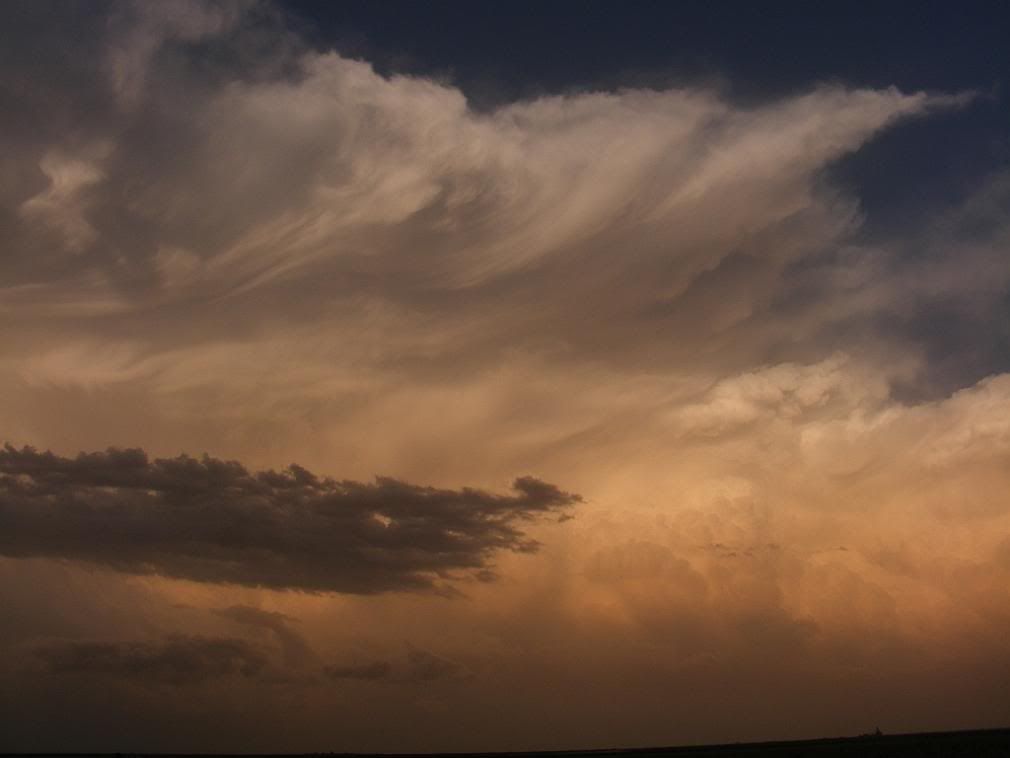
I have a series of amazing cloud formations, too: Not tornado clouds, but detailed storm images with lots of structure. Example--- sunset thunderstorm:

(click for larger)

Other members of the same tour took photos as well, and we've been sharing then via email. While I finish assembling my photos and videos, here are some from fellow tour-takers: different angles and moments from the same storm:

Dave Parrot:


Steve Carey:
http://www.youtube.com/watch?v=GC7U-i5i5eM


More to come!

Wednesday, June 4, 2008

at last--- videos

Here are the first 3, on a single page on google video. Be sure to play the files in the correct 1-2-3 order, even if Google displays them in a different order.

Or, click 'em one by one. Of course, with Google's lower resolution, it'd probably best NOT to run the video windows too large.

Vid 1

Vid2

vid3

Youtube and the new Silverlight beta 2 are both refusing to process my videos--- I have no idea why as I'm well within the file type/length limits.

I've had that happen before: I can produce two files with photos from the same camera, processed and assembled into a video by the same person (moi) on the same hardware and software, and yet one file will upload fine and the other won't. The error messages from online video hosts are uselessly vague, so there's nothing to go on to find a fix. I've tried re-producing the files, changing their names, lengths, and any other variables I can tweak. Sometimes, a re-revised files goes up. But some never make it, and there's no way to find the problem.

So for now, it's Google, on the theory that something is better than nothing.

There's more to come. Hope you enjoy!