Saturday, February 28, 2009

Hard way to die...

Man, 28, Dies After 'Guzzling' Viagra During 12-Hour Romp

Thursday, February 26, 2009

A Russian man died after guzzling a bottle of Viagra to keep him going for a 12-hour orgy with two female pals.

The women had bet mechanic Sergey Tuganov $4,300 that he wouldn’t be able to follow through with the half-day sex marathon.

But minutes after winning the bet, the 28-year-old died of a heart attack, Moscow police said.

“We called emergency services but it was too late, there was nothing they could do,” said one of the female participants who identified herself only as Alina.

===========


My question is: How will they get the coffin closed?

Friday, February 27, 2009

About that comet....

Did you try to see Lulin?

I did. I got up at 4am on Wednesday and went outside in the 10F (-12C) weather. Not knowing if the sky was even clear, I didn't bother gearing up for the cold and went out in my bathrobe and pajamas. Imagine me saying this in falsetto: It was a mite nippy.

The sky had some clouds, and I couldn't find the comet at first. I retreated to warmer areas to consult some start charts, and then ventured out again.

Aha. There it was. I used binoculars to find it initially, but once I knew where it was, I could see it unaided, especially using "averted vision" Wikipedia refers to this as a "controversial" method, but that's bunk: It works. The idea is that the fovea--- the central focus of your eye--- is best for detail, but the surrounding area is actually more sensitive to dim light. You can't see detail with averted vision, but you can see very faint objects by looking just to the side of the thing you want to see. Every amateur astronomer knows this, Wikipedia be damned. 8-)

So there it was: a very faint, irregularly roundish glowing cloud. Time lapse photos taken with large-aperture instruments show the comet's greenish hue, but it was a dim misty gray or blue-grey to my eyes, just on the edge of visibility.

It was one of those things that's cool if you know what you're seeing, but pretty unimpressive otherwise. Oh well. If I'd let my eyes dark-adapt, I might have been able to see it with direct vision, but it was cold and 4AM, so I declared victory and went back to bed.

It was still fun to do, although if I'd been a brass monkey, I would have left parts behind on the frozen ground.

If you want to give it a shot, the maps here will help--- it will still be visible for a short while to come:
http://www.skyandtelescope.com/observing/highlights/35992534.html

I also found this site while digging up comet info. It has nothing to do with the comet, but contains some wonderful astronomical eye-candy:
http://www.astronomynorth.com/Replay2008.html

Enjoy!

Thursday, February 26, 2009

Still on the prowl for missing disk space

The "Volume Shadow Copy Service" (VSS) has been a part of Windows since 2003 and can silently consume prodigious amounts of disk space. Here's how to keep this almost-invisible service from devouring the hard-drive capacity on your XP or Vista system.
That's the lead item in my column in the WindowsSecrets newsletter this week.

VSS is a little weird; while parts of it can truly be a godsend (and the article explains why), if unconfigured or poorly configured, it can be assigned infinite space--- it'll keep going until it eats your entire hard drive. My article, titled "Tame Windows' Volume Shadow Copy Service" helps you use the service without having it run amok.

The other items this week include:
  • Tuning "Thunderbird," the popular open source email client

  • A fix for Windows' broken installer utility

  • And (ahem), a correction. I admit it: I messed up the answer in Feb. 19 column, "Why am I locked out of the Registry?" I referred to the Group Policy Editor (GPedit) as if it were available in all versions of Windows, but it's not. The utility is included only in non-Home versions. Here's why I messed up: As of this writing, there are 26 — yes, 26 — different versions of Windows in use: five of XP, nine of Server 2008, one of Home Server, and 11 of Vista. Many of the Group Policy settings can exist and be edited in all versions, but the little front-end GPedit applet is found only in some of those versions. But you know what? You don't need it! I straighten it all out in this issue, and show how you can still easily manage the Group Policy settings even in versions of Windows that don't have the little GPedit applet.
The guys who run WindowsSecrets put my column in the paid-subscription section which operates on the honor-system principle: You decide what the content is worth, and whatever you decide to pay lets you in to *all* the paid-edition content (not just my column) for a full year.

Full info (you start by signing up for the spam-proof free version) here:
http://windowssecrets.com/

Thanks for checking it out!

Tuesday, February 24, 2009

Try to laugh when you read this.

Eight years ago today:

"My plan reduces the national debt, and fast. So fast, in fact, that economists worry that we're going to run out of debt to retire." — GW Bush radio address, Feb. 24, 2001

Monday, February 23, 2009

Undead Articles

It's bizarre. Someone slapped together an article on "low-tech fixes for high-tech problems" and quoted a very old article of mine, among others. I don't know where the article originated, but the piece ran in the Personal Tech section of the NY Times last week, and once it appeared there, it was picked up all over.

Here was the strangest pickup of that item so far:

======
Google News Alert for: "Fred Langa"

Mẹo rẻ tiền cho các rắc rối hi-tech
Thông tin công nghệ - Vietnam
"Mẹo này đã được chứng minh và được coi là biện pháp cứu vãn cuối cùng", Fred Langa chia sẻ trên trang Windows Secrets. "Nhiều trường hợp đĩa cứng hỏng là ...
======

It's always vaguely disconcerting to see old material dug up and presented as new, especially in the fast-moving tech world. Advice that might be perfectly correct for a given time and place may be wildly inappropriate years later, with different tech.

That's not quite the case here: The writer Mixmastered several ideas from my article into one, but what emerged wasn't hideously wrong.

But it's still weird when an old article rises from the grave, slaps on a hockey mask, starts its chain saw, and begins visiting cottages by the lake again.

Once stuff is on the web, it cannot be killed!


Saturday, February 21, 2009

Is this chart accurate?


I've mentioned GraphJam.com before. Sometimes, the graphs are silly and trying way too hard. Other times, though, they're wonderful.

Friday, February 20, 2009

Unusual Green Comet Approaching (Really!)


Depending on where you live, it probably visible in binoculars or just barely visible by naked eye. It's still brightening though--- next week is its closet approach. It will also pass close to Saturn in the night sky next week, making a nice show in binocs or wide-field telescopes.

http://www.skyandtelescope.com/observing/highlights/35992534.html

Thursday, February 19, 2009

Locked out of your Registry?

"Locked Out of the Registry?" is the lead question we tackle in my WindowsSecrets column this week. There can be benign causes that prevent Registry editing or access, but hostile software also can be the culprit: Malware may do this to make it hard to root out the offending program. My column discusses what to do to regain control.

We also answer three other reader-submitted questions:
  • What are external hard drives best for?
  • Why can't you print BIOS setting from within the BIOS setup program?
  • How can you make various windows auto-maximize on open?
WindowsSecrets runs my weekly column in its paid-subscription section which operates on the honor-system principle: You decide what the content is worth, and whatever you decide to pay lets you in to *all* the content (not just my column) for a full year.

Full info (you start by signing up for the spam-proof free version) here:
http://windowssecrets.com/

Thanks for checking it out!

Tuesday, February 17, 2009

Silencing a noisy fan, part 2

In Part One, you saw how my efforts to silence a tiny, siren-like fan in my new PC were foiled by a premature motherboard death.

It may be hubris, but I really don't think anything I did harmed the motherboard. Everything I'd done, I'd done before many times without trouble. And that particular motherboard was a relatively inexpensive one with some known burn-in problems. So, if only to preserve my pride, I'll choose to believe that the problem wasn't with my work. 8-)

But my judgment is another matter: I probably shouldn't have cheaped out in making that initial choice of motherboard. So in shopping for a new motherboard, I moved up the product stream a bit to this:


(As usual, click these images for a larger version.)

I still had a high-quality CPU from the dead motherboard, and although I had no way to test it, my theory was that the CPU (and everything else) was fine, and that only the motherboard itself had failed.

So I bought a base (no CPU) XFX 780i motherboard. I liked its features:

(PS: the above image was shamelessly stolen from Newegg.com, one of my favorite online electronics retailers.)

I especially liked that motherboards's approach to cooling.

Here's an end-on view of the motherboard:


And here's the built-in passive (fanless!) cooling system, here outlined in yellow:

The motherboard uses a series of large heat sinks and radiators interconnected with passive heat pipes to move heat around to where it can be dumped into the air.

Here's the earlier plan view with the same yellow outline of the passive motherboard cooling system.


This motherboard comes as a very complete kit:


Note the small box at the lower right. It's a small optional fan that can sit atop the largest motherboard heat sink for extra cooling, if needed. But I wanted to see if I could keep things cool without adding any small, high-speed fans to the box.

Below: A vertical view of the CPU socket. To the right, you can see the largest passive motherboard heat sink and radiator. It's connected via a silver heat pipe to another, smaller heat sink and radiator towards the bottom of the photo.


The CPU carrier is protected by a plastic shipping plate. Removing the plate exposes the socket.


The CPU carrier is a clamping device that holds the CPU in the socket. Here, I've raised the clamping lever:


Here's a side view of the same thing. This also gives you a good view of the passive heat sinks and radiators:


I dropped in the CPU I salvaged from the dead motherboard. It fell into place effortlessly, as it should:


This is the CPU, by the way: An Intel Core 2 Quad. It's actually four separate and interconnected CPUs in one integrated unit (hence the "quad" designation) . All four CPU subunits operate at 2.66 GHz.


With the CPU in place and the clamping lever engaged, I gooped on some thermal grease and then spread it very, very thin:


The enlargement (below) shows the viscous thermal grease spread so thin that you can see the marks left by individual ridges in my fingerprints. The bare metal of the top of the CPU peeks through the "valleys" in the grease. That's just what you want: the grease will be smooshed to a very thin uniform layer when the CPU heat sink is attached. You want the thermal grease just thick enough to fill any imperfections in the mating surfaces of the CPU and its heat sink, and no more.


Because I was springing for a new motherboard, I figured whatthehell: I also replaced the CPU heat sink and fan.

The CPU fan and heat sink on the earlier now-dead motherboard had been OK, but only just. It wasn't silent or even particularly quiet. But the screaming motherboard fans in that unit had made replacing the CPU fan a lower priority.

I now had what I hoped would be a motherboard that would require no noisy, high-speed fans at all, so the noise of the CPU cooler would be more prominent. So, I bought this beast:


It's an unusual axial-flow design. Most conventional CPU coolers blow air vertically. They work, but bathe the motherboard in the waste heat produced by the CPU. In contrast, axial flow means the warmed air exiting the copper heat sink fins can be vented directly towards the power supply fan and out the case without blowing on the motherboard. The heavy-duty components inside a power supply are far less sensitive to heat than the delicate electronics of a motherboard, so I liked the axial-flow concept.

I've used Zalman cooling components before, and like them a lot. They're well engineered and well made. Look at the mirror finish on the bottom of the heat sink, for example (below). Remember how we talked about the better the contact between the heat sink and the CPU, the better the heat transfer? A surface ground and polished flat is optimal for maximizing contact.

Also (above) note how the heart of this cooler is a series of looping heat pipes that run through the heat sink and carry heat to the copper fins, where it can be dumped into the air flowing through. Most standard CPU coolers use only conduction to get heat out to the fins. The heat pipes here should help ensure that heats gets out of the CPU as rapidly as possible, which is just what you want.

Plus, Zalman's specialty is *quiet* cooling; that's how the company got its start. Their fans are engineered and application-specific to move large amounts of air with a minimum of fan noise and turbulence.

Here's the cooler assembly mounted atop the CPU:


And here (below) is a closeup of the base:


I really like how Zalman pays attention to the little details. For example, their mounting system is excellent. The black plastic pieces you see above form half of the mount, and clamp the cooler to the top of the CPU with surprising force. This maximizes heat transfer.

The other half of the mount is invisible in that photo because it's on the underside of the motherboard: It's a large backing plate. This distributes the considerable weight of the cooler over a large area, and ensures that the forces of the heavy spring action holding the heat sink to the CPU don't deform or flex the motherboard. It's all very well-engineered, and a pleasure to work with.

Here's a view from the side of the cooler that will face the power supply. The loops of heat pipe are clearly visible.


In the photo below, you can see the relationship between the CPU cooler and the motherboard's triangular passive heat sink and radiator, to its right. The CPU cooler's fan will draw air through the passive motherboard radiator, too, helping to keep everything cool without adding the optional fan to the motherboard.


Here (below) it's all back in the case, and I'm getting ready to wrap things up.


I used the same large, ganged fans I'd zip-tied together for the previous motherboard:


I made a little zip-tie hinge for one side of the fans:


That way, if I need full access to the motherboard at some point in the future. I can snip one of the simple looped zip-ties on the other side of the fans and rotate the whole fan assembly out of the way.


Oops, almost forgot. The above photo also shows a small system/case fan to the left of the CPU cooler. The PC case originally came with a standard system fan, which is to say a cheap, noisy one. I had another small, quiet Zalman case fan ($8 or so) from previous cooling project, and used that instead.

As you can see below, everything spun up fine.


And I do mean fine. I put the system though another long maxed-out burn in, and it ran perfectly. Windows recognized that it was running on a different motherboard, so I had to reactivate the OS; that wasn't a problem. And, of course, I had to load drivers for this specific motherboard after Windows initially started with generic drivers. The new motherboard came with a driver CD, so this was no problem.

This system is *very* well-cooled. For example, image manipulation is a fairly CPU-intensive task; one that can drive up system temps as the CPU works hard to manipulate the millions of pixels in a hi-res photo. After processing all the photos for this blog post--- resizing them for the web; adjusting color, contrast and clarity; doing some crops and rotations--- this was how the system fared:


For our metric friends, I apologize for the Fahrenheit scale: All the significant temps shown above are in the vicinity of 38C or so. In short: This is a very well-cooled system!

And: Literally whisper-quiet. You can hear a gentle white-noise whooosh, but there is absolutely no mosquito-like or hair-dryer-like component to the sound. It's not a silent system (that can be done, but it's very expensive). But this *is* a blessedly library-quiet system, and one I can sit beside all day without annoyance.

Yes, this was a larger project because I had to replace the motherboard that got fried in the December ice storm here; and then a second motherboard that died a premature death. But the actual replacing of the fans themselves was minor work with a big payoff.

Remember: you don't have to live with excessive fan noise in your PC!

Monday, February 16, 2009

What's the Opposite of "Hallmark?"

The Washington Post asked its readers to write a Valentine's Day couplet with the most romantic first line and the least romantic second line. Here are some of the entries.

1. My darling, my lover, my beautiful wife:
Marrying you has screwed up my life.

2. I see your face when I am dreaming.
That's why I always wake up screaming.

3. Kind, intelligent, loving and hot;
This describes everything you are not.

4. Love may be beautiful, love may be bliss,
But I slept with you 'cause I was pissed.

5. I thought that I could love no other
That is, until I met your brother.

6. Roses are red, violets are blue, sugar is sweet, and so are you.
But the roses are wilting, the violets are dead, the sugar bowl's empty and so is your head.

7. I want to feel your sweet embrace;
But don't take that paper bag off your face.

8. I love your smile, your face, and your eyes
Damn, I'm good at telling lies!

9. My love, you take my breath away.
What have you stepped in to smell this way?

10. My feelings for you no words can tell,
Except for maybe 'Go to hell'

Sunday, February 15, 2009

His time was up

http://tinyurl.com/6h69qv


The body of Wang Diange, from the Chinese province of Inner Mongolia, was found in the wreckage of a house where he had been overseeing the wake of a previous family funeral, after mourners felt a loud explosion which took off half the roof.

As it was raining and thundery, they decided that the house, and Mr Wang in particular, had been struck by lightning. The police came to the same conclusion.

Further inquiries were made a few days later after Mr Wang's own funeral. As his body was being put into the cremation chamber, it blew up spectacularly, bursting the doors off the oven.

When the fire had been put out, the only clue as to what had happened was a small twisted piece of metal, which seemed to be the glowing remnants of a screw.

At first, local metallurgists were unable to determine what it was, though they noted it bore a military serial number. After a lengthy investigation, however, it was suggested it might be part of a shell casing.

Inquiries revealed that the rainfall on the day of the original disaster was triggered by the local weather bureau, which had been firing shells into the atmosphere to break up hail in order to protect the local tobacco crop.

Inside the shells were silver iodide, a chemical that helps to break up hail into rain.

Their own investigators concluded that one shell must have failed to explode, hit the house, and lodged in Mr Wang's body. There it passed unnoticed because of his extensive injuries, according to local newspaper reports.

As a result, and three years after Mr Wang died, his family have now received 80,000 yuan (£8,000) in compensation from the weather bureau.


Friday, February 13, 2009

Silencing a noisy fan

A long time ago in a galaxy far, far away, I wrote a four-part series on how to silence noisy PC fans. The 4th article is here, and it has links to the three earlier parts which explain all the hows and whys of fan noise. There are three main factors:
First, there's the turbulent flow of the air itself--this is the white-noise "whoosh" normally produced by all fans. It's speed dependent: The faster the fan spins, the more energetic the turbulence, and the greater the airflow noise.

Second, the fan blades themselves also make noise as they slice through the air. Most of the noise actually comes from the tips of the blades, which are the fastest-moving part of the fan assembly. The faster the fan spins, the more noise the blade tips make.

Finally, there's the mechanical noise of the fan assembly itself. The motors and bearings in fans make at least a little noise, but cheap fans using needle or sleeve bearings make more noise than ball-bearing fans; and fans manufactured sloppily may suffer from vibration-inducing imbalances. All these noises get worse with speed: The faster the fan spins, the more mechanical noise it produces.

PC makers usually opt for the cheapest solutions for cooling: small, cheap, high-speed fans. As a result, many PCs sound like hair dryers.

They don't have to.

I won't repeat the stuff in the above article--- it's just a click away. But the bottom line is that replacing small, fast-spinning fans with larger, slow-spinning fans can make your PC literally whisper-quiet without sacrificing any cooling ability. In fact, your PC can end up quieter *and* cooler.

After December's ice storm ate my main PC's motherboard (despite its being connected to a UPS/surge suppressor), I decided it was time for a new one. The PC death was annoying, but I'd gotten four years of very hard use out of it (running nearly 24/7, with lots of hardware and software experiments and upgrades along the way). I really couldn't complain too much.

Plus, that PC was a home-built model, something I've been doing for quite a while now. Usually, when a PC needs replacement, parts of it are still fine. Buying a PC kit or a "bare bones" unit lets you reuse the still-good parts in the new machine, saving time and money.

For example, a few years ago I built a $500 1 terabyte "network storage device" for an article I was working on. At the time, the least expensive commercial models cost double that.

I still had the four lightly-used 250GB drives that had been the core of that project; I didn't need to buy a PC with yet another humongous drive. So buying a kit-built PC would let me spec the new machine without drives, enabling me to re-use the large drives I had on hand.

Kit-built and "bare bones" PCs are easily available (eg Tigerdirect.com) and inexpensive, and they've served me well over the years.

But this time, I screwed up. I cheaped out on the motherboard, getting one that the various reviews and user forums were split on: an nVidia 680i. The board could perform very well, but users complained about high "infant mortality" (yes, a real term used in the PC business for parts that arrive dead, or die soon after being put in service) and about noisy fans.

Well, the fans I could deal with, and I'd watch for early trouble and simply return the board for replacement if there was a problem.

The parts arrived and I spent a day deep in the geek zone, assembling and testing the new PC. It worked fine, except, as noted, the fans were awful.

I used the new box for a few days, figuring than any instances of infant mortality would happen then. Everything worked fine.

nVidia motherboards come with a very nice monitoring tool that lets you see (among other things) the temperatures of critical parts. I used this a lot, to get a sense of what "normal" temps were for this board with the OEM cooling in play.

Once the system seemed reliable, it was time to replace the offending fans. This tiny terror was the worst (click for larger images):


Despite the name (below) there was nothing magic about this piece of plastic crap. It spun at incredibly high speed and volume, generating a persistent mosquito-like whine.


Here it is (below) in its natural habitat, just to the left of the memory sticks.


Closer and flat-lit for detail:


It had to go.

I removed the fan and its tiny, cheap, stamped-steel heat sink:


It had gone easily, so far, so I figured "why not?" and also went after the other small fan on the motherboard, although it was neither as small nor as loud as the the little siren-like sucker I'd just pulled.

Say goodbye to this fan, too:


Out it came, followed by its heavy, die-cast heat sink:


In this motherboard design, the heatsinks are held in place with plastic spring-loaded prongs which fit through drilled openings in the motherboard itself. It's easier to work on with the motherboard removed from the case. Here's the naked motherboard with the the offending fans and heat sinks removed:


Heat sinks work by increasing the mass and surface area of a chip: The sinks absorbs heat from the chip and releases it to the fan-forced air circulating in the case.

Heat gets from the chip to the heat sink by simple conduction: the heat sink's base presses firmly against the top surface of the chip. The better the contact between the heat sink and the chip, the better the heat transfer.

"Thermal grease" is a compound that improved conduction by filling tiny imperfections in the surfaces of the heat sink and chip. I'd collected a bunch of small tubes of the stuff over the years. Replacement heat sinks usually come with a tube or two; and it's cheap anyway.

I did have one tube of high-quality stuff:


It's a tiny syringe filled with a nonhardening plastic compound that contains a high percentage of tiny silver shavings; silver is an outstanding heat conductor (even better than copper).


I think that tube cost me $10, and it's lasted literally for years. You don't need a lot; just a small dollop on the surfaces, which you then spread to a uniform thin coat.


Once the chips were greased up, I reattached the now-fanless heat sinks:


Next step was ensuring that the reinstalled heatsinks would get plenty of airflow, but from large, slow-spinning fans instead of the original screamers. Here are the small original fans (left) and the large replacement fans (right):


I also had those larger fans on hand from older projects, they were about $8 each when I bought them. Cheap! They spin slowly and very quietly, but move a *ton* of air.

I ganged the two fans together with zip ties:


And then used more zip ties to position the fans exactly where I wanted them:


I love working with zip ties: They're strong, cheap (maybe a penny each, in bulk), infinitely adjustable (so you can position things precisely where you want) and they're plastic to they don't conduct sound or vibration very much. Perfect for suspension-mounting fans!

With the fans on, a veritable hurricane was blowing inside the case, but the fans only made a gentle sustained whooooshing sound instead of the raucous whine of the original fans.

Once the system had booted, the first thing I did was fire up the nVidia system monitor, and was pleased to see that the chip temps were actually a bit lower than they'd been with the factory fans. Success!

I left the PC on its side with the case open and used a tool called Burn In to stress the CPU to its max, running the CPU flat out under full load for several hours--- way more than it would ever be likely to be pushed under real-life conditions. Everything ran perfectly. The CPU temp climbed a bit to 118F (47C) and stabilized there, nowhere near the max allowable temps of 149F/64C.

I placed the case upright, replaced the cover, and reran the tests: Essentially the same results, within a degree or two. I now had a much quieter, cool-running PC. I was good to go, with cooling to spare!

That evening, I set the PC to work overnight importing hundreds of gigs of files I've stored. I checked in on the PC from time to time, making sure all was well. With the new fans blowing a hurricane inside the case, and with the system not working very hard, all the temps inside the case were not much above room temperature. The CPU itself--- the hottest part of the PC--- remained just under 100F/37C. Great!

But in the morning, the system was dead. What!?

The fans were spinning and the lights were on, but no one was home. The system was totally nonresponsive. Everything inside the case was still cool or only slightly warm to the touch, just as it had been when I last checked it. The only thing that was different was that the it wouldn't do anything; or, when powered off, would not boot. There were no failure messages, and no beep-codes for diagnostics. I used all my geek mojo and tried every trick I know, all to no avail. It was just plain dead.

All I can surmise is that the motherboard had indeed suffered infant mortality, as that specific board is known to do. But it happened after I'd removed the fans and heatsinks--- making the board ineligible for product return. I was now the proud owner of a dead and nonreturnable motherboard.

The story has a happy ending though. In fact, I'm using the same PC to type this post. But there were a few more hoops to jump through before I get everything the way it should be. More on that next week!

Thursday, February 12, 2009

Down in the UserDumps

It's unusual to encounter a truly "wow!" experience with operating systems as old as Windows XP. But XP still surprises me on occasion. Maybe this XP peculiarity will be new to you as well.

My Jan. 8, 2009 WindowsSecrets, column, "On the trail of mysterious missing disk space," discussed a reader's problem with disk space that was decreasing with no obvious cause. The answer I gave was complete as far as it went, but this recent eye-opening moment made me realize I may have missed something major.

I came across it quite by accident at a family gathering. My brother asked me to check out an XP system he maintains. Like the system discussed a few issues back, this one was losing tons of disk space. My brother, an able tech guy, knew where the problem was: each day, the system would generate hundreds and hundreds of megabytes in "dump" files! Each day!

I had never seen anything quite like that. Worse, standard cleanup tools (some of which have specific settings to clean up dump files) didn't work.

We tracked down the source of the trouble, and eventually were able to root out the dump files using a very old-school technique. We were even able to automate the cleanup, to avoid future hassles.

It's all explained in this week's column at Windows Secrets.

My other topics this week:

ReadyBoost is one of the odder features built into Vista. It's very cool tech and it sounds great at first. Microsoft says:

"You can use nonvolatile flash memory, such as that on a universal serial bus (USB) flash drive, to improve performance without having to add additional memory 'under the hood.' The flash memory device serves as an additional memory cache, that is, memory that the computer can access much more quickly than it can access data on the hard drive. Windows ReadyBoost relies on the intelligent memory management of Windows SuperFetch and can significantly improve system responsiveness."

Wow, that sounds great, right? But, alas, it's not. In fact, I think ReadyBoost is a downright dumb idea, and I explain it in the column.

Are leftover Windows Installer files necessary? These are the files left in C:\Windows\Installer. In the column, I describe a trick I've used for years to easily determine is *any* file is really needed or not.

Retrieve a lost product key for Windows XP. I describe several totally legitimate, 100% legal ways of restoring lost product keys so you can reinmstall Windows or other software.

WindowsSecrets runs my columns in its paid-subscription section which operated as an honor-system: You decide what the content is worth, and whatever you decide to pay lets you in for a full year.

Full info (you start by signing up for the spam-proof free version) here:
http://windowssecrets.com/

Thanks for checking it out!

Tuesday, February 10, 2009

Google Killed Bambi

Google Maps' "street views" are mostly collected by automobile. The cars have a special multi-lens camera pod attached to the roof.

In this photo, the camera pod is on the left; on the right, it's mounted on a car:


There are many different kinds of cars and trucks used. (See http://tinyurl.com/bk77sb )

The vehicles continuously record views in all directions while a GPS records exactly where the vehicle is. That way, each frame or exposure can be collated with a specific location and orientation.

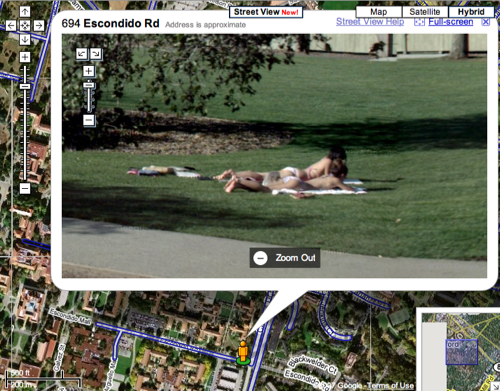
Because they're just ordinary vehicles rolling down the streets, people don't pay a lot of attention to the cars. As a result, the Google cameras sometime capture images of interesting things; often people doing something unusual. A very mild example:


There are photos of crimes in progress, people making love or passed out in doorways, a woman peeing in the street--- some strange stuff.

There are even sites devoted to finding and discussing weird stuff in Street Views. You can find such site--- where else?--- on Google:

http://tinyurl.com/cwnzxv
http://www.streetviewfun.com/
http://mashable.com/2007/05/31/top-15-google-street-view-sightings/
http://www.gstreetsightings.com/
etc.

Sometimes, things get even stranger, such as this, when Google killed Bambi:

http://www.theregister.co.uk/2009/01/30/who_killed_bambi/