
Saturday, January 31, 2009


Friday, January 30, 2009
hoax and counter-hoax
You've probably seen this drawing, part of a (very funny) hoax mail that went around with the subject line something like "Always check your children's homework!"

It went around and died out, as these thinsg do, but then recently resurfaced with this wonderful addition; supposedly from the Mom to the teacher:
"Dear Ms. Davis,
I want to be very clear on my child's illustration. It is NOT of me on a dance pole on a stage in a strip joint. I work at Home Depot and had commented to my daughter how much money we made in the recent snowstorm. This photo is of me selling a shovel.
Mrs. Harrington"

It went around and died out, as these thinsg do, but then recently resurfaced with this wonderful addition; supposedly from the Mom to the teacher:
"Dear Ms. Davis,
I want to be very clear on my child's illustration. It is NOT of me on a dance pole on a stage in a strip joint. I work at Home Depot and had commented to my daughter how much money we made in the recent snowstorm. This photo is of me selling a shovel.
Mrs. Harrington"
Thursday, January 29, 2009
I'm glad you can't see me now.
I just got off the treadmill, or, as I prefer to call it, the dreadmill.
It's been cold enough here lately to make an extended time outdoors a bit of a hassle; many layers of clothing, hat, gloves, heavy boots, and (if walking fast in the snowy forest for exercise) trekking poles for balance and traction. If it's recently snowed, snow shoes may also be needed, at least until the trails get packed down. And if it's very cold or windy, longjohns, too.
It's fun to be out in serious cold, but it's certainly not convenient.
On days when I have too much to do to make it worthwhile to don a closet's-worth of midwinter clothing for some basic outdoor exercise, I'll do penance for my mostly sedentary life through indoor exercise.
My current routine involves stretching, neck- and torso twists for flexibility and toe-touches to offset the stiffness that comes from 30 years of working in the same seated position. I do some minor weight work and some push ups to try to offset my total lack of upper-body exercise--- typing isn't noted for building broad shoulders and brawny biceps. And then I do a Torquemada-inspired treadmill program with varying inclines and speeds.
I consider a successful exercise routine as one where I live through to the end. I'd be in much better shape if the palpitations from a fourth cup of espresso constituted a proper cardio workout.
Sigh.
The treadmill keeps careful track of my times as I gallumph through the various programmed running and hill-climbing settings. As I slog up pseudo-hills and down dummy dales, I read the flickering LEDs and take great comfort knowing that if I were only three times faster, I'd be a halfway decent runner.
I've given up on the idea of actually gaining much visible benefit from exercise. The only way I'll ever look truly buff is through Photoshop. I do, however, harbor the faint hope of perhaps slowing the inevitable decline of advancing years; digging in my heels to try to slow galloping decrepitude to a mere canter. Whoa, big fella! Please god, whoa!
OK, OK. I exaggerate a bit. But, to mix metaphors, I guess exercise isn't so much about gaining altitude anymore; it's more about extending the glide.
Well, *trying* to extend the glide, anyway. Perhaps Teterboro is too far away, but maybe we can at least make it to the Hudson...
So today, after one such delightful interlude on the mill of dread, I sit before you sweaty, unshaved, probably somewhat ripe, in my ratty workout clothes.
Be glad you're not here. 8-)
It's been cold enough here lately to make an extended time outdoors a bit of a hassle; many layers of clothing, hat, gloves, heavy boots, and (if walking fast in the snowy forest for exercise) trekking poles for balance and traction. If it's recently snowed, snow shoes may also be needed, at least until the trails get packed down. And if it's very cold or windy, longjohns, too.
It's fun to be out in serious cold, but it's certainly not convenient.
On days when I have too much to do to make it worthwhile to don a closet's-worth of midwinter clothing for some basic outdoor exercise, I'll do penance for my mostly sedentary life through indoor exercise.
My current routine involves stretching, neck- and torso twists for flexibility and toe-touches to offset the stiffness that comes from 30 years of working in the same seated position. I do some minor weight work and some push ups to try to offset my total lack of upper-body exercise--- typing isn't noted for building broad shoulders and brawny biceps. And then I do a Torquemada-inspired treadmill program with varying inclines and speeds.
I consider a successful exercise routine as one where I live through to the end. I'd be in much better shape if the palpitations from a fourth cup of espresso constituted a proper cardio workout.
Sigh.
The treadmill keeps careful track of my times as I gallumph through the various programmed running and hill-climbing settings. As I slog up pseudo-hills and down dummy dales, I read the flickering LEDs and take great comfort knowing that if I were only three times faster, I'd be a halfway decent runner.
I've given up on the idea of actually gaining much visible benefit from exercise. The only way I'll ever look truly buff is through Photoshop. I do, however, harbor the faint hope of perhaps slowing the inevitable decline of advancing years; digging in my heels to try to slow galloping decrepitude to a mere canter. Whoa, big fella! Please god, whoa!
OK, OK. I exaggerate a bit. But, to mix metaphors, I guess exercise isn't so much about gaining altitude anymore; it's more about extending the glide.
Well, *trying* to extend the glide, anyway. Perhaps Teterboro is too far away, but maybe we can at least make it to the Hudson...
So today, after one such delightful interlude on the mill of dread, I sit before you sweaty, unshaved, probably somewhat ripe, in my ratty workout clothes.
Be glad you're not here. 8-)
Wednesday, January 28, 2009
Best Simpson's joke ?
I used to watch the Simpsons regularly. When it's good, it's wonderful, but the great moments are coming with less regularity.
Here's a classic, when Bart prank-calls a bar in Sweden:
===========
BARTENDER: Ja? I shall inquire. Is there a Mr. Myfriendsaregay, first name Olav? Attention, everyone; Olav Myfriendsaregay!
Patrons laugh smugly
BARTENDER: Wait a minute...if I ever get a hold of you, I will thank you for showing me the futility of human endeavor.
===========
OK, maybe you had to be there. Or maybe you needed several years of film criticism courses in college, leading to a Bergman overdose.
Never mind. I think I'll have a bowl of strawberries and play chess with death, now.
Here's a classic, when Bart prank-calls a bar in Sweden:
===========
BARTENDER: Ja? I shall inquire. Is there a Mr. Myfriendsaregay, first name Olav? Attention, everyone; Olav Myfriendsaregay!
Patrons laugh smugly
BARTENDER: Wait a minute...if I ever get a hold of you, I will thank you for showing me the futility of human endeavor.
===========
OK, maybe you had to be there. Or maybe you needed several years of film criticism courses in college, leading to a Bergman overdose.
Never mind. I think I'll have a bowl of strawberries and play chess with death, now.
Tuesday, January 27, 2009
Sherman, set the WayBack machine...
I'm still hip-deep in various tech projects, and it's turning into one of those times where you start one project but discover that a different small task needs to be done first. So you detour to start that small task, but then discover that another small task needs to be done first. So you re-detour to do that and then discover... well, you get the idea.
Eventually, you're off in the weeds with a dozen "small tasks" standing between you and your original task.
My Virtual PC item (yesterday) was from one such side excursion (Look! A chicken!), but I thought you might be amused by this fresh screen capture:
Here's Windows 3.11 running (yes, running; fully functional) in a virtual PC, hosted on my current Vista system:
(click to enlarge)

Win3.11 ("Windows for Workgroups") was the first "complete" graphical OS from Microsoft, with built-in support for mice, VGA color (that's a 640x480 "full screen" VGA image, above) , CD drives, sound and networking. Before Win3.0, you had to load separate drivers for each of those those.
With that version of Windows, Microsoft brought full functionality and ease of use (previously the domain of the very pricey Mac) to the large installed base of cheap, ubiquitous DOS PCs, and the rest, as they say, is history. Windows became--- and remains today--- the world's dominant operating system. All because of the success of Windows 3.x
BTW, in that screen grab, above, note "Program Manager." That's what eventually became the Desktop. "Control Panel" is still called that, although its functions have expanded enormously. And "File Manager" is what we now call Windows Explorer.
Other things from 3.11 are still present in today's Windows, but morphed almost to nonrecognition. For example, the "PIF Editor" is today's "Compatibility" tab in file Properties.
There are a few other minor differences, too. For example:
The Windows directory in my 3.11 installation contains 149 files and weighs in at 9.21 MB.
The Windows directory in my copy of Vista contains 53,946 files and comprises 12.1 GB.
Yes, minor differences.
I don't want to sit in my virtual rocker, sucking on my virtual gums and reminiscing about the good old days when a complete operating system fit on a floppy. Why I remember when we had to carve our ones and zeros from solid blocks of wood, and were were glad to do it because it was a step up from knotted strings and abaci...
But it's fun to look back, no?
Eventually, you're off in the weeds with a dozen "small tasks" standing between you and your original task.
My Virtual PC item (yesterday) was from one such side excursion (Look! A chicken!), but I thought you might be amused by this fresh screen capture:
Here's Windows 3.11 running (yes, running; fully functional) in a virtual PC, hosted on my current Vista system:
(click to enlarge)

Win3.11 ("Windows for Workgroups") was the first "complete" graphical OS from Microsoft, with built-in support for mice, VGA color (that's a 640x480 "full screen" VGA image, above) , CD drives, sound and networking. Before Win3.0, you had to load separate drivers for each of those those.
With that version of Windows, Microsoft brought full functionality and ease of use (previously the domain of the very pricey Mac) to the large installed base of cheap, ubiquitous DOS PCs, and the rest, as they say, is history. Windows became--- and remains today--- the world's dominant operating system. All because of the success of Windows 3.x
BTW, in that screen grab, above, note "Program Manager." That's what eventually became the Desktop. "Control Panel" is still called that, although its functions have expanded enormously. And "File Manager" is what we now call Windows Explorer.
Other things from 3.11 are still present in today's Windows, but morphed almost to nonrecognition. For example, the "PIF Editor" is today's "Compatibility" tab in file Properties.
There are a few other minor differences, too. For example:
The Windows directory in my 3.11 installation contains 149 files and weighs in at 9.21 MB.
The Windows directory in my copy of Vista contains 53,946 files and comprises 12.1 GB.
Yes, minor differences.
I don't want to sit in my virtual rocker, sucking on my virtual gums and reminiscing about the good old days when a complete operating system fit on a floppy. Why I remember when we had to carve our ones and zeros from solid blocks of wood, and were were glad to do it because it was a step up from knotted strings and abaci...
But it's fun to look back, no?
Monday, January 26, 2009
Virtual Machines
Recently, Vincent has left a new comment on the post "Reader Questions":
Re: Your comment about the preference for Vista Biz to run VM's. I was wondering what VM's you're running? I've been using Sun's Virtual Box in VHome Premium and it seems to run everything (mostly linux distros) well.
=================
First, to get us all on the same page, a definition: Virtual machine. And here's an ancient article I wrote on the technology.
I use the free Microsoft Virtual PC because it works fine, is easy to set up, is free, and, well, because of inertia. I have many, many VMs set up on disk, ready to be activated as needed. I actually have every version of Windows on VM all the way back to Windows 3.0.
Mostly I use it to test things on versions of an OS that I'm not currently using. If I'm answering a question about, say, XP, but I'm running Vista, it's very handy to have a complete, for-real XP installation running inside a Vista window.
It's also good for "I wonder what will happen if..." experiments. I'll clone a VM and run my nefarious tests on it. If I blow up the software, so what? Exit and delete the mangled VM, make a fresh copy, start over. Elapsed time: a minute or two. No laborious rebuilding of a system or trying to get things back they way they were.
VMware makes an excellent VM system too, although in all but its most basic and limited form, you have to pay for it. It's really intended for commercial deployment.
And there are others, too, as Vince alludes to. (EG http://www.virtualbox.org/ )
Very cool tech!
Re: Your comment about the preference for Vista Biz to run VM's. I was wondering what VM's you're running? I've been using Sun's Virtual Box in VHome Premium and it seems to run everything (mostly linux distros) well.
=================
First, to get us all on the same page, a definition: Virtual machine. And here's an ancient article I wrote on the technology.
I use the free Microsoft Virtual PC because it works fine, is easy to set up, is free, and, well, because of inertia. I have many, many VMs set up on disk, ready to be activated as needed. I actually have every version of Windows on VM all the way back to Windows 3.0.
Mostly I use it to test things on versions of an OS that I'm not currently using. If I'm answering a question about, say, XP, but I'm running Vista, it's very handy to have a complete, for-real XP installation running inside a Vista window.
It's also good for "I wonder what will happen if..." experiments. I'll clone a VM and run my nefarious tests on it. If I blow up the software, so what? Exit and delete the mangled VM, make a fresh copy, start over. Elapsed time: a minute or two. No laborious rebuilding of a system or trying to get things back they way they were.
VMware makes an excellent VM system too, although in all but its most basic and limited form, you have to pay for it. It's really intended for commercial deployment.
And there are others, too, as Vince alludes to. (EG http://www.virtualbox.org/ )
Very cool tech!
Sunday, January 25, 2009

Saturday, January 24, 2009
A new art form...
... of sorts.
It's a collection of the custom, animated "Loading..." screens you see when software is starting up. I'd never really thought about them before, but this site treats them as art, and there's something to that perspective:
Just click, sit back, and enjoy--- they run one after another with no user input required:
http://www.prettyloaded.com/
It's a collection of the custom, animated "Loading..." screens you see when software is starting up. I'd never really thought about them before, but this site treats them as art, and there's something to that perspective:
Just click, sit back, and enjoy--- they run one after another with no user input required:
http://www.prettyloaded.com/
Friday, January 23, 2009
Here's a headline you don't see every day
Flaming Squirrel To Blame In Jones Wildfire
http://www.koco.com/cnn-news/18530377/detail.htmlThursday, January 22, 2009
Back from Pittsburgh
Just got back from five days in Pittsburgh--- fun trip. I'll get caught up ASAP.
Meanwhile, here's what's in my portion of the just-out issue of Windows Secrets:
The dreaded "Run DLL as an App" error:
The "Run a DLL as an App" problem doesn't happen very often, but it can be a royal pain when it does. Fortunately, there are a several troubleshooting methods that can cut to the chase and get things working again with a minimum amount of hassle.
Sites won't recognize correct browsers or add-ons:
"Fred, lately I've run into lots of sites that don't recognize the browser I'm using as IE, or as Firefox when I'm using Firefox. It sends me to a page that tells me I should use IE or Firefox--but I *am*! And many sites that use Flash are unable to recognize that my IE or Firefox browser already has v. 9 of Flash installed! Help! I am at a loss on BOTH problems! It has crippled my use of the Web!"
Energy Vampires:
Often, "off" doesn't really mean off. And it can cost you an extra $35 per year per PC!
Powerful tool can simplify Registry edits:
Windows Secrets readers span the full range of PC skills, from novice to uber-geek. This tip from reader Jay Rumanek definitely leans towards the expert side of things, but if that's where you live, you may find his suggestion very useful.
Access to these items is almost free: You pay only whatever you think the content is worth (there's no set fee); your one-time payment gets you access for an entire year.
More info: https://windowssecrets.com/
I appreciate your support there.
Meanwhile, here's what's in my portion of the just-out issue of Windows Secrets:
The dreaded "Run DLL as an App" error:
The "Run a DLL as an App" problem doesn't happen very often, but it can be a royal pain when it does. Fortunately, there are a several troubleshooting methods that can cut to the chase and get things working again with a minimum amount of hassle.
Sites won't recognize correct browsers or add-ons:
"Fred, lately I've run into lots of sites that don't recognize the browser I'm using as IE, or as Firefox when I'm using Firefox. It sends me to a page that tells me I should use IE or Firefox--but I *am*! And many sites that use Flash are unable to recognize that my IE or Firefox browser already has v. 9 of Flash installed! Help! I am at a loss on BOTH problems! It has crippled my use of the Web!"
Energy Vampires:
Often, "off" doesn't really mean off. And it can cost you an extra $35 per year per PC!
Powerful tool can simplify Registry edits:
Windows Secrets readers span the full range of PC skills, from novice to uber-geek. This tip from reader Jay Rumanek definitely leans towards the expert side of things, but if that's where you live, you may find his suggestion very useful.
Access to these items is almost free: You pay only whatever you think the content is worth (there's no set fee); your one-time payment gets you access for an entire year.
More info: https://windowssecrets.com/
I appreciate your support there.
Wednesday, January 21, 2009
Tuesday, January 20, 2009
Monday, January 19, 2009
An Interplay of Art and Science
This site's a little obsessive, but I like how it visually explores its decidedly unusual subject matter.
http://tinyurl.com/7mrkq2
http://tinyurl.com/7mrkq2
Sunday, January 18, 2009
Saturday, January 17, 2009

Friday, January 16, 2009
Reader Questions
I'm glad my hardware and software misadventures caught your interest. It's always nice to see comments and get the private emails after a, er, somewhat unusual post. :)
Maybe More on Windows 7 wasn't so strange, but Something stirs in the rubble.... certainly felt strange from this end.
If for nothing else, at least I can serve as an example of what sleep deprivation and fatigue toxins can do. If I were feeling graphical right now, I might put it this way:
Anyway, Ed_P suggested that I should have used Bart's PE, a nifty little self-booting, self-contained Windows-live-on-a-CD. It's hugely customizable, too. I agree with Ed that it's a great tool.
And I do have a Bart's CD ready to go, with a pile of repair and diagnostic tools also on the CD. Alas, XP couldn't properly see the hard drive, so the PE setup/recovery tools were useless. Ditto the original XP setup CDs. If XP can't see the drive, no XP-based tool will work.
The really strange thing was that MS-DOS, Windows 98, FreeDOS and Linux all could see the hard drive just fine. But not XP or Vista.
I ultimately wiped the disk using BootIt NG, then gave the disk over to a wholly alien OS; one that had never been on that drive before. I let Kbuntu format the entire disk as ext3 and then let GRUB set up the Linux boot records. Linux installed and ran just fine. (Linux itself is fine. I just don't like it all that much. Too much effort for too little reward.)
Once I was sure the hard drive was working normally, I then used BootIt to wipe out the new Linux setup. My thinking was that, if a mangled bit had been preventing XP from seeing the drive, that bit would likely be at least twice overwritten now, and thus probably beaten back into submission.
I then formatted the disk as NTFS and FAT32, and--- it worked. I was able to install Vista from DVD. I then let Bootit take over partition management and the boot sequencing... and all was well.
Once the drive was working, I could have restored a disk image and gotten the previous working setup back in one step. This is, in fact, the way I'd normally do this.
But I wanted to upgrade my laptop from Vista Home Premium to Vista Business so I could more easily run virtual machines (I use them to test software), among other things.
I did a clean install of Vista Biz to give myself the best possible start. I could and did restore my data from previous images and backups, but I didn't want the previous OS; hence the clean install.
Brad Gilbert also wondered about my 1TB drive; it's fine, at last. Long story. (Actually, two stories, because I also got another large external drive. Yes, my backups have backups.)
When I'm finally done cannibalizing the old hardware and spreading it around, I should end up with 2 laptops (a nice main one and a barely adequate, last-ditch spare), a brand new kick-ass desktop system with 2.25TB of onboard storage and 1TB external; and a couple of Frankenstein test rigs.
I'm not done yet, but I can see the phosphor at the end of the screen, so to speak. I've taken photos along the way; some of the experimental stuff might be mildly amusing for you to see.
Stay tuned!
Maybe More on Windows 7 wasn't so strange, but Something stirs in the rubble.... certainly felt strange from this end.
If for nothing else, at least I can serve as an example of what sleep deprivation and fatigue toxins can do. If I were feeling graphical right now, I might put it this way:
This is your mind:

This is your mind after 36 hours
of nonstop geekery:

This is your mind after 36 hours
of nonstop geekery:

Anyway, Ed_P suggested that I should have used Bart's PE, a nifty little self-booting, self-contained Windows-live-on-a-CD. It's hugely customizable, too. I agree with Ed that it's a great tool.
And I do have a Bart's CD ready to go, with a pile of repair and diagnostic tools also on the CD. Alas, XP couldn't properly see the hard drive, so the PE setup/recovery tools were useless. Ditto the original XP setup CDs. If XP can't see the drive, no XP-based tool will work.
The really strange thing was that MS-DOS, Windows 98, FreeDOS and Linux all could see the hard drive just fine. But not XP or Vista.
I ultimately wiped the disk using BootIt NG, then gave the disk over to a wholly alien OS; one that had never been on that drive before. I let Kbuntu format the entire disk as ext3 and then let GRUB set up the Linux boot records. Linux installed and ran just fine. (Linux itself is fine. I just don't like it all that much. Too much effort for too little reward.)
Once I was sure the hard drive was working normally, I then used BootIt to wipe out the new Linux setup. My thinking was that, if a mangled bit had been preventing XP from seeing the drive, that bit would likely be at least twice overwritten now, and thus probably beaten back into submission.
I then formatted the disk as NTFS and FAT32, and--- it worked. I was able to install Vista from DVD. I then let Bootit take over partition management and the boot sequencing... and all was well.
Once the drive was working, I could have restored a disk image and gotten the previous working setup back in one step. This is, in fact, the way I'd normally do this.
But I wanted to upgrade my laptop from Vista Home Premium to Vista Business so I could more easily run virtual machines (I use them to test software), among other things.
I did a clean install of Vista Biz to give myself the best possible start. I could and did restore my data from previous images and backups, but I didn't want the previous OS; hence the clean install.
Brad Gilbert also wondered about my 1TB drive; it's fine, at last. Long story. (Actually, two stories, because I also got another large external drive. Yes, my backups have backups.)
When I'm finally done cannibalizing the old hardware and spreading it around, I should end up with 2 laptops (a nice main one and a barely adequate, last-ditch spare), a brand new kick-ass desktop system with 2.25TB of onboard storage and 1TB external; and a couple of Frankenstein test rigs.
I'm not done yet, but I can see the phosphor at the end of the screen, so to speak. I've taken photos along the way; some of the experimental stuff might be mildly amusing for you to see.
Stay tuned!
Thursday, January 15, 2009
New "LangaList Plus" column posted at WindowsSecrets.Com
It's Thursday, so there's a new "LangaList Plus" column posted at WindowsSecrets.Com.
We all know that too little memory cripples a computer, but did you know you also can buy too much?
So, the in-depth topic this week is: How much is too much RAM, and how high can your system memory go?
The complete answer on how much RAM a given system can handle will help you understand not only your current system, but also for any future systems you may own.
Also in this column:
Recover bad sectors after a hard-disk crash
Trouble accessing a public Wi-Fi network
Access to the above content is almost free: You pay only what you think the WindowsSecrets newsletter is worth (there's no set fee--- you decide); whatever you pay that once gets you access to all the paid content, including my columns, for an entire year.
Want to have a question answered in that column? Use the "contact" info at the end of the column to send in questions you might like me to try answering. And you can also rate the content to let me know how I'm doing.
More info: https://windowssecrets.com/
Thanks for your support!
We all know that too little memory cripples a computer, but did you know you also can buy too much?
So, the in-depth topic this week is: How much is too much RAM, and how high can your system memory go?
The complete answer on how much RAM a given system can handle will help you understand not only your current system, but also for any future systems you may own.
Also in this column:
Recover bad sectors after a hard-disk crash
Trouble accessing a public Wi-Fi network
Access to the above content is almost free: You pay only what you think the WindowsSecrets newsletter is worth (there's no set fee--- you decide); whatever you pay that once gets you access to all the paid content, including my columns, for an entire year.
Want to have a question answered in that column? Use the "contact" info at the end of the column to send in questions you might like me to try answering. And you can also rate the content to let me know how I'm doing.
More info: https://windowssecrets.com/
Thanks for your support!
Wednesday, January 14, 2009
Write like a Babylonian


Those are my initials (FSL), in cuneiform, one of the very earliest human written languages. The writing style, originally done by making impressions on soft clay tablets that were then sun-dried, dates from the Bronze Age. ( http://en.wikipedia.org/wiki/Cuneiform_script )
See your name/initials:
http://www.upennmuseum.com/cuneiform.cgi
Tuesday, January 13, 2009
More on Windows 7
OK, OK. A brief moment of seriousness:
Win7 *is* a beta--- unfinished software. Bugs are normal in betas; that's why it's unfinished software. A beta test is designed to see what needs fixing before the final "gold" code is delivered.
And I was trying it not in a careful lab setting but on an daily-use machine (yes, the data was all backed up and safe). I knew the risks, especially of tossing beta software into the maelstrom of full-bore daily use, with third party software and all the bells and whistles going.
My use also included a third-party boot manager; I suspect that the unfinished Win7 installation code fought with the boot manager, or vice versa, and flipped some key and hard-to-unflip bit in a boot or disk ID record. This is an interesting factoid, but not a condemnation of the Win7 software. It's beta!
My larger problem was running three full-scale experiments at once. Separately, the problems were all totally manageable. But having all three blow up at the same time strained my backup and recovery systems to the max.
Still, it qualifies as a self-inflicted injury. My use of the beta verged on abuse; and having three major experiments going at once was, well, tempting fate. Look Ma! No hands! Urk.....
I know it's de rigeur to parrot the same old tired jokes about Microsoft, but Win7 really does look pretty good. The UI, based on Vista, is very polished and slick. Even in beta, parts of the OS were noticeably faster, too.
Jokes aside, Microsoft does its UI homework. It spends more on UI R&D than any other software company in the world, which is one of the reasons why the XP interface is the most-copied UI in the world.
(PS: The Mac UI? Not invented by Apple. The iPod? Not invented by Apple. The guts of OSX? Not invented by Apple. Etc etc etc. Think different!)
Anyway, when Win7's finished, I'll move to it with few qualms. Now that most new hardware and software is Vista-compatible, Win7's roll out, when the software's finished, should have all the benefits of Vista with far fewer of the drawbacks.
I screwed up in my work, and I thought parts of it might make you guys smile. That's all.
I just didn't want to have a humorous post lead to misinformation.
Now excuse me, because I have to get rid of these Gremlin corpses before they start to smell.
Win7 *is* a beta--- unfinished software. Bugs are normal in betas; that's why it's unfinished software. A beta test is designed to see what needs fixing before the final "gold" code is delivered.
And I was trying it not in a careful lab setting but on an daily-use machine (yes, the data was all backed up and safe). I knew the risks, especially of tossing beta software into the maelstrom of full-bore daily use, with third party software and all the bells and whistles going.
My use also included a third-party boot manager; I suspect that the unfinished Win7 installation code fought with the boot manager, or vice versa, and flipped some key and hard-to-unflip bit in a boot or disk ID record. This is an interesting factoid, but not a condemnation of the Win7 software. It's beta!
My larger problem was running three full-scale experiments at once. Separately, the problems were all totally manageable. But having all three blow up at the same time strained my backup and recovery systems to the max.
Still, it qualifies as a self-inflicted injury. My use of the beta verged on abuse; and having three major experiments going at once was, well, tempting fate. Look Ma! No hands! Urk.....
I know it's de rigeur to parrot the same old tired jokes about Microsoft, but Win7 really does look pretty good. The UI, based on Vista, is very polished and slick. Even in beta, parts of the OS were noticeably faster, too.
Jokes aside, Microsoft does its UI homework. It spends more on UI R&D than any other software company in the world, which is one of the reasons why the XP interface is the most-copied UI in the world.
(PS: The Mac UI? Not invented by Apple. The iPod? Not invented by Apple. The guts of OSX? Not invented by Apple. Etc etc etc. Think different!)
Anyway, when Win7's finished, I'll move to it with few qualms. Now that most new hardware and software is Vista-compatible, Win7's roll out, when the software's finished, should have all the benefits of Vista with far fewer of the drawbacks.
I screwed up in my work, and I thought parts of it might make you guys smile. That's all.
I just didn't want to have a humorous post lead to misinformation.
Now excuse me, because I have to get rid of these Gremlin corpses before they start to smell.
Monday, January 12, 2009
Something stirs in the rubble....
It's me.
I'm writing this Monday night on my backup laptop. My main PC is down. My main laptop is down. My three old experimental/sacrificial systems are down. Worse, so is my brand new one.
Oh, and I cooked a 1TB external drive along the way, too.
The Tech Gods must be angry.
It's the outcome of a series of separate simultaneous experiments--- a hardware upgrade and cannibalization, moving from aging XP-based hardware to new Vista-based hardware; a quiet-cooling experiment with a new "bare bones" experimental system; and a test of the Windows 7 beta.
Windows 7 was the worst of it. It ate a hard drive. Mangled the boot sector so badly--- but subtly!--- that I couldn't reinstall Vista or XP: their setup disks alarmingly reported "No hard drive found" even though the BIOS and other OSes *could* see the hard drive.
Lots of manual tweaking; lots of pointy-head, pocket-protector excursions (including having to a do a full-disk Linux format and install---Kubuntu 8.10, if you're interested--- as part of the recovery process).
I also had a column due this weekend for the Windows Secrets newsletter. As my various systems winked out one by one, I kept retreating into older and smaller systems to stay ahead of the destruction and to be able to keep working.
But the gremlins followed me from system to system, leaving only dead silicon in their wake. I'd retreat further, setting up full shop in an even simpler, smaller, older system. My writing output dropped. Online research went slower and slower. The hours ticked by. I contemplated writing and sending in the column by telegraph or semaphore.
And still the gremlins came.
Late last night, it was like a scene out of Tolkien:
There I stood, my back against the deadline, its cold unyielding surface reminding me I had nowhere to run. I surveyed the landscape, littered with dead and dying PCs, and Lo! There they were. A horde of Gremlins. Vast. Unstoppable.
Sensing my fear, they pick up speed and sweep towards me over the cables and cooling fans, wheeling around the heat sinks and crashing headlong across the copper-traced fresh green of my motherboards: a ravening Gremlin army of Delays and Troubles, feral eyes aglitter at the scent of fresh geek. I hear their guttural cry: "Glitch! Glitch!"
As if in answer, a Common Sense calls softly in the distance, urging me to bed and head-clearing rest. But I had no time to listen. I was on a mission.
On they came, an unending stream, and not just Gremlins! An evil army undulated to the horizon, an unbroken wave of Bugs, Errors, Blunders, Boo-boos, Deviations, Errata, Failures, Faults, Flaws, Goofs, Inaccuracies, Lapses, Miscalculations, Miscues, Misjudgments, Missteps, Misunderstandings, Omissions, Oversights, Screw-ups, Stumbles and Slips.
I fought them all. But I was losing.
After midnight, when fatigue started to get the better of me, the gremlins called in even more reinforcements: a phalanx of fresh Fuckups rode in on horseback to join the fray.
Worse, I had been deceived. Some of my Bestideas turned out to be Fuckups in disguise.
I was doomed. There I stood, my back hard against a deadline with no further retreat possible. But, like Leonidas at Thermopylae, I was determined to finish the day carrying my keyboard, or be carried on it.
During a break in the battle I stabbed a few wounded gremlins and ate an apple.
I told myself to remember:
This. Is. BLOGGING!!!!
OK, OK.
I did end up literally pulling an all-nighter last night. I napped a bit on the sofa at dawn this morning while doing the umpteenth reformat of a hard drive. It's been a long day.
I'm still on my backup laptop but I finally got my main laptop to boot Vista normally about an hour ago, and I'm now restoring the system from backups.
Almost everything will get working again, and the parts that won't were OK to lose, which is why I was experimenting with them.
But man, I haven't had a beta bite me this badly in 10 years. (Caution, my friends: there be dragons in that download.) And I don't know how long it's been since I ran into so many glitches at once.
It's like I opened Schroedinger's box, and a whole damn litter died.
Remember, don't try this computer savagery at home. I'm a trained professional. I know exactly what--- hey, wait a minute. Does that smell like burning insulation to you?
I'm writing this Monday night on my backup laptop. My main PC is down. My main laptop is down. My three old experimental/sacrificial systems are down. Worse, so is my brand new one.
Oh, and I cooked a 1TB external drive along the way, too.
The Tech Gods must be angry.
It's the outcome of a series of separate simultaneous experiments--- a hardware upgrade and cannibalization, moving from aging XP-based hardware to new Vista-based hardware; a quiet-cooling experiment with a new "bare bones" experimental system; and a test of the Windows 7 beta.
Windows 7 was the worst of it. It ate a hard drive. Mangled the boot sector so badly--- but subtly!--- that I couldn't reinstall Vista or XP: their setup disks alarmingly reported "No hard drive found" even though the BIOS and other OSes *could* see the hard drive.
Lots of manual tweaking; lots of pointy-head, pocket-protector excursions (including having to a do a full-disk Linux format and install---Kubuntu 8.10, if you're interested--- as part of the recovery process).
I also had a column due this weekend for the Windows Secrets newsletter. As my various systems winked out one by one, I kept retreating into older and smaller systems to stay ahead of the destruction and to be able to keep working.
But the gremlins followed me from system to system, leaving only dead silicon in their wake. I'd retreat further, setting up full shop in an even simpler, smaller, older system. My writing output dropped. Online research went slower and slower. The hours ticked by. I contemplated writing and sending in the column by telegraph or semaphore.
And still the gremlins came.
Late last night, it was like a scene out of Tolkien:
There I stood, my back against the deadline, its cold unyielding surface reminding me I had nowhere to run. I surveyed the landscape, littered with dead and dying PCs, and Lo! There they were. A horde of Gremlins. Vast. Unstoppable.
Sensing my fear, they pick up speed and sweep towards me over the cables and cooling fans, wheeling around the heat sinks and crashing headlong across the copper-traced fresh green of my motherboards: a ravening Gremlin army of Delays and Troubles, feral eyes aglitter at the scent of fresh geek. I hear their guttural cry: "Glitch! Glitch!"
As if in answer, a Common Sense calls softly in the distance, urging me to bed and head-clearing rest. But I had no time to listen. I was on a mission.
On they came, an unending stream, and not just Gremlins! An evil army undulated to the horizon, an unbroken wave of Bugs, Errors, Blunders, Boo-boos, Deviations, Errata, Failures, Faults, Flaws, Goofs, Inaccuracies, Lapses, Miscalculations, Miscues, Misjudgments, Missteps, Misunderstandings, Omissions, Oversights, Screw-ups, Stumbles and Slips.
I fought them all. But I was losing.
After midnight, when fatigue started to get the better of me, the gremlins called in even more reinforcements: a phalanx of fresh Fuckups rode in on horseback to join the fray.
Worse, I had been deceived. Some of my Bestideas turned out to be Fuckups in disguise.
I was doomed. There I stood, my back hard against a deadline with no further retreat possible. But, like Leonidas at Thermopylae, I was determined to finish the day carrying my keyboard, or be carried on it.
During a break in the battle I stabbed a few wounded gremlins and ate an apple.
I told myself to remember:
This. Is. BLOGGING!!!!
OK, OK.
I did end up literally pulling an all-nighter last night. I napped a bit on the sofa at dawn this morning while doing the umpteenth reformat of a hard drive. It's been a long day.
I'm still on my backup laptop but I finally got my main laptop to boot Vista normally about an hour ago, and I'm now restoring the system from backups.
Almost everything will get working again, and the parts that won't were OK to lose, which is why I was experimenting with them.
But man, I haven't had a beta bite me this badly in 10 years. (Caution, my friends: there be dragons in that download.) And I don't know how long it's been since I ran into so many glitches at once.
It's like I opened Schroedinger's box, and a whole damn litter died.
Remember, don't try this computer savagery at home. I'm a trained professional. I know exactly what--- hey, wait a minute. Does that smell like burning insulation to you?
Sunday, January 11, 2009
The Fad has officially peaked
The meme is dead. Long live the meme!
http://www.time.com/time/magazine/article/0,9171,1870492,00.html
http://www.time.com/time/magazine/article/0,9171,1870492,00.html
Saturday, January 10, 2009

Friday, January 9, 2009
A Movie I Chose Not To Watch
Final Draft NR 

A screenwriter loses his grip on reality after locking himself in his apartment to meet a deadline.
---------
OK, I'm not a screenwriter. But after the Apple-Bacon Pie Caper, I wonder about the "losing a grip on reality" part. Ulp.
---------
OK, I'm not a screenwriter. But after the Apple-Bacon Pie Caper, I wonder about the "losing a grip on reality" part. Ulp.
Thursday, January 8, 2009
I've been hearing nice things from readers about my column at WindowsSecrets. (Thank you!)
I've recently more or less given up on the very, very short length that Brian and I initially tried. It required leaving out too much good information and/or writing in a style so telegraphic as to be mechanical and dust-dry. As a reader myself, I don't like to read stuff written that way. And I gotta tell you, as a writer, it's no fun to write that way, either.
So, items are now longer and more in the classic "LangaList" style that some of you may remember. It feels good to be back in that groove again, and from the positive comments I've gotten, at least some of you like it, too. :-)
Anyway, my new column this week covers:
One-Step Windows Reinstalls
Imagine: Click your mouse once and take a coffee break. When you return, Windows and all your apps are perfectly reinstalled, tuned, customized and ready to rock.
Dual-booting Vista and XP
Missing disk space
More free bandwidth-monitoring tools
https://windowssecrets.com/
I've recently more or less given up on the very, very short length that Brian and I initially tried. It required leaving out too much good information and/or writing in a style so telegraphic as to be mechanical and dust-dry. As a reader myself, I don't like to read stuff written that way. And I gotta tell you, as a writer, it's no fun to write that way, either.
So, items are now longer and more in the classic "LangaList" style that some of you may remember. It feels good to be back in that groove again, and from the positive comments I've gotten, at least some of you like it, too. :-)
Anyway, my new column this week covers:
One-Step Windows Reinstalls
Imagine: Click your mouse once and take a coffee break. When you return, Windows and all your apps are perfectly reinstalled, tuned, customized and ready to rock.
Dual-booting Vista and XP
Missing disk space
More free bandwidth-monitoring tools
https://windowssecrets.com/
Tuesday, January 6, 2009
Don't you hate it what that happens?

Skier Suffers Exposure
Man left dangling upside down, pantsless after Vail lift mishap
JANUARY 6--In a bizarre incident that will surely lead to litigation (or an out-of-court settlement), a skier at Colorado's ritzy Vail resort was left dangling upside down and pantsless from a chairlift last Friday morning. The January 2 mishap apparently occurred after the male skier and a child boarded a high-speed lift in Vail's Blue Sky Basin. It appears that the chairlift's fold-down seat was somehow not in the lowered position, which caused the man to partially fall through the resulting gap. His right ski got jammed in the ascending chairlift, and that kept him upended since his boot never dislodged from its binding. As seen in the photos on the following pages (which were snapped by fellow skiers), the Skyline Express lift was stopped shortly after the pair's botched 10:30 AM boarding resulted in the man dangling from the lift. The exposed skier was stuck for about 15 minutes before Vail personnel backed the lift up and successfully dislodged the unidentified man from the four-seat chair.
Monday, January 5, 2009
Strange mechanical Swiss calculator
An old-school, professional-quality, hand-cranked pocketable analog computer:
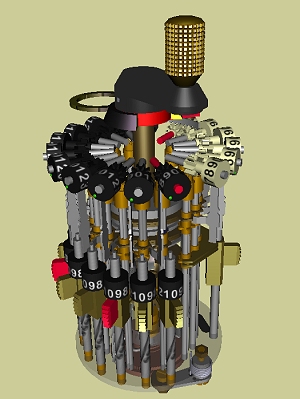

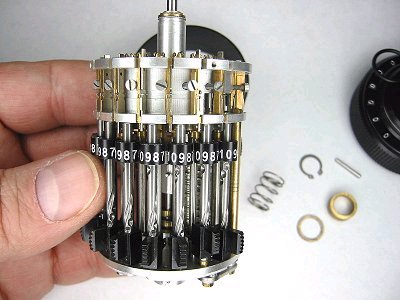
It's almost a fetish object to some:
http://www.vcalc.net/cu.htm
It's almost a fetish object to some:
http://www.vcalc.net/cu.htm
Sunday, January 4, 2009
Strange humor
After reading of cases where surgeons operate on the wrong organ or body part, I've heard of the sensible practice of writing with indelible ink on the correct (and incorrect) body parts to ensure that no targeting errors are made in the O.R. You know, "NOT THIS LEG" or "THE OTHER KIDNEY, YOU IDIOT" or some such.
(I'm not kidding. See this:
http://www.foxnews.com/story/0,2933,339270,00.html I'm not sure what that poor woman could have written, or where, to avoid that outcome.)
An acquaintance was recently having surgery to correct an old football injury to his neck. He wasn't so much worried about them operating in the wrong part, but wanted to write a message on his neck that would surprise and amuse the O.R. staff at the start of surgery.
He asked for help in a public forum, and the suggested replies were amazing.
My favorite(scroll down):
Here are some others:
===========
Insert hand to control puppet
Pack it in, pack it out...
Contents may have settled during shipping.
After stuffing, place in preheated oven @ 375f.
feed hamster before leaving
requires 4 AA batteries
Warranty void if skin Broken
Call before you dig
Caution: Buried Cables
Refrigerate after opening.
Open at own risk
No user serviceable parts inside
Please remove all loose marbles.
In case of zombie attack remove Head
Disregard Looks: This is not a circumcision.
A drawn-on zipper
A drawn-on hinge
I talk! Press here for a demo!
Insert two quarters
Not a Step
Do not Stack Over 5 High
Insert Back Bone Here
Slot A
May contain nuts
Hecho en China
While you're in there, I've also got a frog in my throat
Prize Inside!
I hope you got a warm heart, cause you damn sure got cold hands.
This end up
Shake well before opening.
Draw two dark arrows point to point. Write "Align Arrows when reattaching head"
=======
I'm gonna have to remember some of those...
(I'm not kidding. See this:
http://www.foxnews.com/story/0,2933,339270,00.html I'm not sure what that poor woman could have written, or where, to avoid that outcome.)
An acquaintance was recently having surgery to correct an old football injury to his neck. He wasn't so much worried about them operating in the wrong part, but wanted to write a message on his neck that would surprise and amuse the O.R. staff at the start of surgery.
He asked for help in a public forum, and the suggested replies were amazing.
My favorite(scroll down):
Copyright (c) Pez Candies, Inc.
Here are some others:
===========
Insert hand to control puppet
Pack it in, pack it out...
Contents may have settled during shipping.
After stuffing, place in preheated oven @ 375f.
feed hamster before leaving
requires 4 AA batteries
Warranty void if skin Broken
Call before you dig
Caution: Buried Cables
Refrigerate after opening.
Open at own risk
No user serviceable parts inside
Please remove all loose marbles.
In case of zombie attack remove Head
Disregard Looks: This is not a circumcision.
A drawn-on zipper
A drawn-on hinge
I talk! Press here for a demo!
Insert two quarters
Not a Step
Do not Stack Over 5 High
Insert Back Bone Here
Slot A
May contain nuts
Hecho en China
While you're in there, I've also got a frog in my throat
Prize Inside!
I hope you got a warm heart, cause you damn sure got cold hands.
This end up
Shake well before opening.
Draw two dark arrows point to point. Write "Align Arrows when reattaching head"
=======
I'm gonna have to remember some of those...
Saturday, January 3, 2009
Friday, January 2, 2009

Thursday, January 1, 2009
Happy New Year!
Subscribe to:
Posts (Atom)